<?xml version="1.0" encoding="UTF-8"?>
<feed xmlns="http://www.w3.org/2005/Atom">
  <link href="https://leejarvis.me/feed.xml" rel="self"/>
  <author>
    <name>Lee Jarvis</name>
    <email>lee@jrvs.uk</email>
  </author>
  <id>https://leejarvis.me/</id>
  <title>Lee Jarvis</title>
  <updated>2021-12-31T09:00:00Z</updated>
  <entry>
    <content type="html"><![CDATA[<p>
I’ve been thinking about ditching Audible for a couple of years now. Besides Amazon being an all-around shitty company, Audible’s push towards AI-narrated content under the guise of “bringing more stories to life” leaves a bitter taste in my mouth. Not to mention the usability of their mobile app declining with every update.</p>
<p>
I had a few hours downtime last week and decided to see what it would take to switch away entirely. Here’s how it went.</p>
<h2>
Liberating my library</h2>
<p>
The first step was to take ownership of the existing titles I’d purchased. Audible’s use of <a href="https://en.wikipedia.org/wiki/Digital_rights_management">DRM</a> is designed to prevent you from easily transferring your content to other platforms. You don’t need an active Audible subscription to play content from your library, but you need to use their app to do so.</p>
<p>
This meant I wouldn’t be able to merge my existing library with a new one. Not having all of my books in the same place would, naturally, cause me an existential crisis.</p>
<p>
Thankfully, this is a solved problem. I used <a href="https://getlibation.com/">Libation</a> to download my entire library, and added it to my iCloud Drive so I could access them from my phone.</p>
<h2>
Alternative services</h2>
<p>
Audible already has an excellent alternative: <a href="https://libro.fm/">Libro.fm</a>. Their catalogue isn’t as large, their search isn’t great, and their app is kinda wonky, but their ethos is excellent. And, importantly, they provide DRM-free audiobooks.</p>
<p>
Problem is, their player does not allow you to import an existing library. This meant I was sorted for playing new books, assuming they were purchased from Libro.fm, but stuck if I wanted to replay my liberated content.</p>
<p>
My library isn’t large (in the low 100s), so I wasn’t against re-purchasing books I loved, but if I moved away from Libro.fm in the future, this is a problem I’d need to solve eventually anyway. I decided Libro.fm was a great solution for purchasing new content, but their app was no good for playing it.</p>
<h2>
Alternative apps</h2>
<p>
I play audiobooks on my iPhone pretty much exclusively, which meant I needed to find an app that allowed me to import and play my library. I found a handful of nice ones:</p>
<ul>
  <li>
<a href="https://github.com/TortugaPower/BookPlayer">BookPlayer</a>  </li>
  <li>
<a href="https://prologue.audio/">Prologue</a>  </li>
  <li>
<a href="https://plappa.me/">plappa</a>  </li>
  <li>
<a href="https://apps.apple.com/ua/app/booken/id6550895937">Booken</a>  </li>
  <li>
<a href="https://www.reddit.com/r/audiobooks/comments/1ohtpt4/i_listen_to_a_lot_of_audiobooks_the_current_apps/">Abookio</a>  </li>
</ul>
<p>
I decided to give BookPlayer a shot. It has a sleek design, <em>and</em> it’s open source, which is a nice touch. Problem solved?</p>
<p>
Not yet. Turns out that ~100 audiobooks take up quite a bit of storage space. It also turns out that my phone does not have much of said storage space.</p>
<p>
Luckily, BookPlayer supports streaming from <a href="https://jellyfin.org/">Jellyfin</a>—a self-hosted media server. Double luckily, I am a bit of a nerd for self-hosting.</p>
<h2>
Self-hosting</h2>
<p>
Self-hosting describes the simple act of hosting your own services. Media, password management, analytics, photo/video syncing, and more. You name it, there’s probably a self-hosted version of it. I could write an entire post on my self-hosting journey, so I won’t expand on that here. Visit <a href="https://www.reddit.com/r/selfhosted/">/r/selfhosted</a> to dive down that rabbit hole.</p>
<p>
I wasn’t hosting a Jellyfin server, but it was really easy to get one up and running. I moved my audiobook files over to my NAS and pointed Jellyfin at them. After a few seconds, my library started appearing in the UI. Like magic.</p>
<p>
The system was really cool, but I quickly bumped into issues with missing metadata and progress tracking. Managing multi-book series was also a bit of a pain. Additionally, BookPlayer requires a subscription to use cloud services like Jellyfin, which is a bit of a bummer. I’m more than happy to pay for apps and one-off unlocks, but I have enough subscriptions to pay for.</p>
<p>
After more Reddit sleuthing, I learned about <a href="https://www.audiobookshelf.org/">Audiobookshelf</a>. It’s basically Jellyfin for audiobooks; a lightweight web app that lets you host and stream your audiobook collection. And it’s excellent. Unfortunately their iOS app is TestFlight only at the moment, and there are no available spaces. So, back to the search for an app.</p>
<p>
Fortunately, some of the other apps on my list above also support Audiobookshelf (Prologue had just announced support in a recent beta, which thankfully had TestFlight spots available). I’ve spent the last several days comparing them.</p>
<h2>
Current status</h2>
<p>
After much trial and error, I’m very happy with where things stand. I’m self-hosting <a href="https://www.audiobookshelf.org/">Audiobookshelf</a> and beta testing <a href="https://prologue.audio/">Prologue</a> for iOS.</p>
<p>
I actually bumped into a bug with audio playback in Prologue earlier today and submitted a report. The app author responded within a couple of hours with a new build for me to test. Very cool.</p>
<p>
As an aside, it really felt like the stars aligned. Only 12 days before posting this, <a href="https://www.trekpins.com/shelfpulse.html">ShelfPulse</a>—an app for monitoring your Audiobookshelf server—launched. It provides a beautiful UI showing your listening stats and progress.</p>
<p>
That’s how I quit Audible. What started as frustration turned into a surprisingly fun tech project, and I’m extremely happy with the result.</p>
]]></content>
    <author>
      <name>Lee Jarvis</name>
      <uri>https://leejarvis.me/</uri>
    </author>
    <id>https://leejarvis.me/posts/2025/quitting-audible</id>
    <title>Quitting Audible</title>
    <updated>2025-11-03T09:00:00Z</updated>
  </entry>
  <entry>
    <content type="html"><![CDATA[]]></content>
    <author>
      <name>Lee Jarvis</name>
      <uri>https://leejarvis.me/</uri>
    </author>
    <id>https://leejarvis.me/posts/2024/phoenix-calendar-component</id>
    <title>Phoenix LiveView Calendar Component</title>
    <updated>2024-08-21T09:00:00Z</updated>
  </entry>
  <entry>
    <content type="html"><![CDATA[<p>
As a software developer, I’ve had the opportunity to work with a variety of
technologies over the years. This website has always served as a subject for
experimenting with such tech — what better way to learn than to develop, maintain
and deploy something not only real, but in this case, very low-stakes.</p>
<p>
As such, this website — and its predecessors — have evolved over the last 18 or
so years. From hand-crafted static HTML pages, to PHP, Perl CGI, modern JS frameworks
and back again to static HTML via tools like <a href="https://jekyllrb.com/">Jekyll</a>
and <a href="https://nanoc.app/">Nanoc</a>.</p>
<p>
It stood to reason then that the next evolution of the website would be built
with <a href="https://www.phoenixframework.org/">Phoenix</a>, the Elixir web framework I’ve
been using for the last few years for personal and work projects.</p>
<p>
I <em>love</em> building apps with Phoenix. I remember the feeling of using Rails 10+
years ago — the sense of immense joy assembling a prototype
in no more than and hour or two. That feeling for Rails has long dissipated,
and a Phoenix has risen, so to speak (sorry).</p>
<p>
As mentioned in <a href="/posts/2022/weeknotes-5-tongues-will-not-change-the-succession">recent weeknotes</a>,
I’ve been keeping a keen eye on the frameworks development, and I’ve been excited
about the latest version, which brings <a href="https://phoenixframework.org/blog/phoenix-1.7-released">built-in Tailwind, Verified Routes and
more</a>.</p>
<p>
Below are some notes about the build.</p>
<h2>
Database-less</h2>
<p>
It’s important to me that this website does <strong>not</strong> depend on a database.
It adds an overhead I’m just not interested in maintaining. This meant I needed
to import my markdown posts from Jekyll in to this new system. That’s easy
enough, but given that Elixir code requires a compilation step, I was concerned
that trying to build this in Phoenix might introduce some frustrating hurdles.</p>
<p>
I was wrong, of course. The excellent <a href="https://github.com/dashbitco/nimble_publisher">NimblePublisher</a>
library solves this with ease. My markdown files are not only processed during
the compilation stage and included as part of the application bundle, they’re
watched for changes such that Phoenix will intelligently reload the page when I make
a change.</p>
<h2>
Tailwind</h2>
<p>
Phoenix 1.7 introduces <a href="https://tailwindcss.com/">Tailwind</a> support out of the box.
CSS isn’t something I particularly enjoy writing, so Tailwind is a massive pleasure
to use. Furthermore, maintaining well-organised CSS is something of a nightmare.
Not really a problem for a tiny website like this, but I still have nightmares
from larger projects. Embedding styles in the markup and using <a href="https://hexdocs.pm/phoenix_live_view/Phoenix.Component.html">Phoenix
components</a> is just
so nice.</p>
<p>
The new design is based on the <a href="https://tailwindui.com/templates/spotlight">Spotlight template</a>.
I usually prefer designing stuff like this from scratch but I really like the
template defaults. I’ve changed bits here and there to give it my personal
touch, but the resemblance remains clear.</p>
<h2>
Deployment</h2>
<p>
The website is deployed to <a href="https://fly.io">Fly.io</a>. I use Fly for several
production apps and they’re stellar. Given the low traffic received here, I can’t
imagine I’ll ever need anything larger than the free tier, which is nice.</p>
<p>
I may move the app to my Linode VPS at some point in future — which is where
I run a handful of Ruby and Go services. Just to give me a better look at what
a “native” deployment looks like. For now though I’m more than happy to let
Fly do the hard work.</p>
<p>
The app is automatically deployed via a <a href="https://github.com/leejarvis/jarvis/blob/main/.github/workflows/deploy.yml">GitHub
Workflow</a>.</p>
<hr class="thin">
<p>
I used to think the idea of rebuilding my website every few years was silly.
Really though, it’s the ideal way to sharpen skills and toy with new and
exciting technology; and Phoenix is about as exciting as it comes right now.</p>
]]></content>
    <author>
      <name>Lee Jarvis</name>
      <uri>https://leejarvis.me/</uri>
    </author>
    <id>https://leejarvis.me/posts/2022/phoenix-tailwind-redesign</id>
    <title>Phoenix Tailwind Redesign</title>
    <updated>2022-12-06T09:00:00Z</updated>
  </entry>
  <entry>
    <content type="html"><![CDATA[<p>
As is tradition on Christmas Day, Santa Claus brought us a new version of Ruby. Ruby 3 introduced some new pattern matching syntax that is no longer experimental. This means you can use these new features without fear of them changing dramatically in any (near-future) version of Ruby. Let’s take a look.</p>
<h2>
Inline matching expressions</h2>
<p>
There are two types of standalone matching expressions. One using <code class="inline">&lt;expression&gt; =&gt; &lt;pattern&gt;</code> and the other uses <code class="inline">&lt;expression&gt; in &lt;pattern&gt;</code>:</p>
<pre><code class="ruby"># Assign `first` to &quot;foo&quot; and `last` to &quot;qux&quot;. The star (*) represents &quot;rest&quot; as in, the rest of the elements we don&#39;t care about
%w(foo bar baz qux) =&gt; [first, *, last]

# We can actually assign the &quot;rest&quot; to a variable:
%w(foo bar baz qux) =&gt; [first, *rest, last]
rest #=&gt; [&quot;bar&quot;, &quot;baz&quot;]

# Raises a NoMatchingPatternError because the lengths differ:
%w(foo bar baz qux) =&gt; [first, last]</code></pre>
<p>
The <code class="inline">in</code> is similar but returns <code class="inline">true</code> if a match is found:</p>
<pre><code class="ruby">%w(foo bar baz qux) in [first, *, &quot;qux&quot;]
#=&gt; true
first #=&gt; &quot;foo&quot;

%w(foo bar baz qux) in [first, &quot;qux&quot;]
#=&gt; false</code></pre>
<p>
We can also include optional classes to match against:</p>
<pre><code class="ruby">%w(foo bar) =&gt; [String =&gt; first, String =&gt; last]
%w(foo bar) in [String, String] #=&gt; true
%w(foo bar) in [String, Integer] #=&gt; false

# Raises a NoMatchingPatternError:
%w(foo bar) =&gt; [String =&gt; first, Integer =&gt; last]</code></pre>
<p>
We can also match against a Hash pattern:</p>
<pre><code class="ruby">{foo: &quot;bar&quot;} =&gt; {foo:}
foo #=&gt; &quot;bar&quot;

{foo: &quot;bar&quot;} =&gt; {foo: renamed}
renamed #=&gt; &quot;bar&quot;

{foo:&quot;bar&quot;} in {foo:}
#=&gt; true

{foo:&quot;bar&quot;} in {bar:}
#=&gt; false

# The braces are optional:
{foo:&quot;bar&quot;} =&gt; foo:
foo #=&gt; &quot;bar&quot;

# with explicit class matching:
{foo:&quot;bar&quot;} =&gt; {foo:String =&gt; renamed}
renamed #=&gt; &quot;bar&quot;

# nested values:
{this: {is: {nested: &quot;value&quot;}}} =&gt; {this: {is: {nested:}}}
nested #=&gt; &quot;value&quot;</code></pre>
<p>
One important thing to mention is that Array matches work against the <em>entire</em> Array. Whereas you can match against a Hash subset:</p>
<pre><code class="ruby">{foo: &quot;bar&quot;, baz: &quot;qux&quot;} =&gt; {baz:} # ignore the :foo key
baz =&gt; &quot;qux&quot;</code></pre>
<p>
We can also mix patterns using the <code class="inline">|</code> operator. Let’s say we want to check if a Hash value is an Integer or a Float:</p>
<pre><code class="ruby">&gt;&gt; {foo: 1.2} in {foo:Integer | Float}
=&gt; true

&gt;&gt; {foo: &quot;bar&quot;} in {foo:Integer | Float}
=&gt; false</code></pre>
<h2>
Expanding to block expressions</h2>
<p>
Now we’ve learned the new syntax, let’s extend this by taking advantage of how the pattern matching syntax works with <code class="inline">case</code> statements.</p>
<p>
Let’s write up a real program this time. This script lists all GitHub repos for a given username, and then asks the user to enter the name of the repo they want more information about. Let’s start by building up to the name selection:</p>
<pre><code class="ruby">#!/usr/bin/env ruby

require &quot;net/http&quot;
require &quot;json&quot;

username = &quot;leejarvis&quot;
endpoint = URI(&quot;https://api.github.com/users/#{username}/repos&quot;)
json = Net::HTTP.get_response(endpoint).body
repos = JSON.parse(json, symbolize_names: true)

# ignore archived and disabled repos
selectable_repos = repos.select { _1 in archived: false, disabled: false }

puts &quot;Enter a repo name to get more information: &quot;
selectable_repos.each { |repo| puts repo[:name] }

repo_name = gets.strip

selectable_repos.each do |repo|
  case repo
  in name: repo_name
    p repo
  else
    # ignore for now
  end
end</code></pre>
<p>
As you can see here, we’re already taking advantage of the new <code class="inline">in</code> syntax by ignoring archived and disabled repos. We could write this as <code class="inline">.reject { |repo| repo[:archived] || repo[:disabled] }</code> but let’s not be a party pooper, eh?</p>
<p>
Now, when we enter a repo name we’ll dump the data for that repo to the console. Here we go:</p>
<pre><code class="ruby">~$ Enter a repo name to get more information:
adventofcode
#=&gt; {:id=&gt;113033185, :name=&gt;&quot;adventofcode&quot;, …}
#=&gt; {:id=&gt;1114377, :name=&gt;&quot;albeano&quot;, …}
#=&gt; lots more repos

~$ Enter a repo name to get more information:
chronic
#=&gt; {:id=&gt;113033185, :name=&gt;&quot;adventofcode&quot;, …}
#=&gt; {:id=&gt;1114377, :name=&gt;&quot;albeano&quot;, …}

~$ Enter a repo name to get more information:
zomgroflbbq
#=&gt; {:id=&gt;113033185, :name=&gt;&quot;adventofcode&quot;, …}
#=&gt; {:id=&gt;1114377, :name=&gt;&quot;albeano&quot;, …}</code></pre>
<p>
Uh, ok. Looks like this isn’t quite working. Every one of our repos is being dumped to the console, it appears to completely ignore our input.</p>
<p>
Enter Variable pinning.</p>
<h2>
Variable pinning</h2>
<p>
In our <code class="inline">case</code> expression above, we’re trying to match against our entered <code class="inline">repo_name</code> — however, as we’ve seen in previous examples, the match <code class="inline">in name: repo_name</code> would assign <code class="inline">name</code> to <code class="inline">repo_name</code> rather than match against it.</p>
<p>
In order to match against our entered value, we need to pin the <code class="inline">repo_name</code> variable:</p>
<pre><code class="ruby">case repo
in name: ^repo_name
  p repo
else
  # ignore for now
end</code></pre>
<p>
Now our program works as expected. Let’s use our deconstructing syntax to pull some information from the repo:</p>
<pre><code class="ruby">repo =&gt; {
  html_url: url,
  default_branch: branch,
  updated_at:,
  watchers_count: Integer =&gt; watching
}

puts &quot;Repo #{repo_name} is available at: #{url}. &quot; \
     &quot;The default branch is #{branch} and it was &quot; \
     &quot;last updated on #{updated_at} and has #{watching} watchers&quot;</code></pre>
<p>
Looking good so far.</p>
<p>
We wouldn’t want to release our script to the world without a sprinkle of Object Oriented programming though, would we? Let’s create a class for our repo and update our list of selectable repos:</p>
<pre><code class="ruby">class Repo
  attr_reader :name, :attributes

  def initialize(attributes)
    @attributes = attributes

    attributes =&gt; {
      name: name,
      html_url: url,
      default_branch: branch,
      updated_at: updated_at,
      watchers_count: Integer =&gt; watching
    }

    @name, @url, @branch, @updated_at, @watching = name, url, branch, updated_at, watching
  end

  def to_s
    &quot;Repo #{name} is available at: #{@url}. &quot; \
         &quot;The default branch is #{@branch}, it was &quot; \
         &quot;last updated on #{@updated_at} and has #{@watching} watchers&quot;
  end
end

selectable_repos = selectable_repos.map { Repo.new(_1) }

selectable_repos.each do |repo|
  case repo
  in name: ^repo_name
    puts repo
  else
    # ignore for now
  end
end</code></pre>
<p>
Looking good. Unfortunately pattern matching doesn’t work with instance variables (maybe one day?), so we have to assign to locals first in our <code class="inline">initialize</code> method.</p>
<p>
Now when we run our program again it.. well, it doesn’t work. This is because our <code class="inline">in name: ^repo_name</code> code is still expecting <code class="inline">repo</code> to be a <code class="inline">Hash</code>.</p>
<p>
Thankfully, the Ruby team have thought about this.</p>
<h2>
Matching non-primitive objects</h2>
<p>
So far we’ve discussed matching against Array and Hash. But how do we match against our new <code class="inline">Repo</code> objects? Well, we just need to add two new methods: <code class="inline">deconstruct</code> and <code class="inline">deconstruct_keys</code>:</p>
<pre><code class="ruby">def deconstruct
  @attributes.keys
end

def deconstruct_keys(keys)
  @attributes.slice(*keys)
end</code></pre>
<p>
We use <code class="inline">deconstruct</code> for Array and find patterns, and <code class="inline">deconstruct_keys</code> for Hash deconstruction. In our <code class="inline">in name: ^repo_name</code> match, the keys passed to <code class="inline">deconstruct_keys</code> will be <code class="inline">[:name]</code> — this allows us to return only the relevant deconstructed values from the attributes hash.</p>
<p>
Let’s play with this a bit in IRB with information we have about inline matching expressions:</p>
<pre><code class="ruby">&gt;&gt; repo =&gt; {name:}
=&gt; nil
&gt;&gt; name
=&gt; &quot;adventofcode&quot;
&gt;&gt; [:name] in repo
=&gt; true</code></pre>
<p>
Now when we run our program again, everything is working fine. We can also include class names as part of our pattern which would restrict the matching a little (right now we’ll match against any object that implements a matching <code class="inline">deconstruct_keys</code>):</p>
<pre><code class="ruby">case repo
in Repo(name: ^repo_name)
  puts repo
else
  # ignore for now
end</code></pre>
<h2>
Wrapping up</h2>
<p>
At first glance, a lot of this syntax just left me squinting. I’m really not sure how I’ll feel seeing some of these patterns used in production code because it seems quite easy to abuse.</p>
<p>
That said, it’s nice to see the Ruby language evolving and I really like the idea of being able to use pattern matching to avoid long conditional statements especially when consuming JSON:</p>
<pre><code class="ruby">data = {
  books: [
    {
      name: &quot;To Kill a Mockingbird&quot;,
      meta: {
        tags: [
          { name: &quot;Novel&quot; },
          { name: &quot;Thriller&quot; }
        ]
      }
    },
    {
      name: &quot;The Lord of the Rings&quot;,
      meta: {
        tags: [
          { name: &quot;Novel&quot; },
          { name: &quot;Fantasy&quot; }
        ]
      }
    }
  ]
}

fantasy1 = data[:books].select do |book|
  book[:meta] &amp;&amp; book[:meta][:tags] &amp;&amp; book[:meta][:tags].any? { |tag| tag[:name] == &quot;Fantasy&quot; }
end

fantasy2 = data[:books].select do |book|
  book in { meta: { tags: [*, { name: &quot;Fantasy&quot; }, *] } }
end</code></pre>
]]></content>
    <author>
      <name>Lee Jarvis</name>
      <uri>https://leejarvis.me/</uri>
    </author>
    <id>https://leejarvis.me/posts/2022/ruby-3-pattern-matching</id>
    <title>Ruby 3.1 - Pattern Matching</title>
    <updated>2022-01-04T09:00:00Z</updated>
  </entry>
  <entry>
    <content type="html"><![CDATA[<p>
This year has been rather uneventful. I’m still figuring out how to be a good father and how to live in a pandemic without going insane.</p>
<p>
Watching my daughter grow in to a real human being has—naturally—been the highlight of my year. She’s already smart, sassy and all around wonderful. She gets that from her mother. We don’t share photos of her on social media, so you’ll just have to believe me when I say she is also cute as a button.</p>
<h2>
Work</h2>
<p>
In July, Spark (the company I co-founded and currently work at as Tech Lead) <a href="https://blog.spark.re/letter-from-the-ceo-9affb0727546">closed Series A financing</a>. This new investment allows us to scale up the dev team and start to implement sensible plans for dealing with technical debt, something we’ve been struggling with recently.</p>
<p>
I finally managed to get out and visit the team in October. I dropped in as a surprise during a “dev appreciation day”, where we were celebrating 10-years since the first commit of the Spark code base:</p>
<pre><code>commit 696c07f5ddd5b0ed5604497941a987dfd5f3f0e8
Author: Lee Jarvis &lt;lee@redacted&gt;
Date:   Sun Oct 16 18:53:36 2011 -0700

    initial commit</code></pre>
<p>
The last time I visited Vancouver was during the months that the company was founded, meaning this was the first time meeting many of the 30+ team I have been working with for years. It was wonderful being able to surprise them.</p>
<p>
And no, my initial project commit messages are no more creative than they were back then.</p>
<h2>
Code</h2>
<p>
I predominantly write Ruby (and more specifically, Rails) code at Spark. My side projects though—of which there are 2-4 at any given time—have so far this year consisted entirely of Elixir (and more specifically, the Rails equivalent <a href="https://www.phoenixframework.org/">Phoenix</a>) applications.</p>
<p>
Ruby means a lot to me, but working with Rails has become tedious and I don’t really know how much longer I have in me. Writing Elixir and Phoenix code on the side has really allowed me to keep focused at work and avoid burnout.</p>
<p>
I expect this pattern to continue through 2022 and beyond, and I suspect further down the line I will likely look to be working on more Elixir code and less Ruby code at my job.</p>
<h2>
Reading &amp; Media</h2>
<p>
I have read an embarrassing number of books this year. I might even be in single digits. I have though managed to keep well up-to-date with my RSS feed which mostly consists of blog posts from independent tech writers and developers.</p>
<p>
I continued to work through my <a href="https://letterboxd.com/leejarvis/">Letterboxd</a> watch list. To pick 3 perhaps lesser-known movies in my top-10 of 2021:</p>
<ul>
  <li>
<a href="https://letterboxd.com/film/nomadland/">Nomadland</a>  </li>
  <li>
<a href="https://letterboxd.com/film/the-father-2020/">The Father</a>  </li>
  <li>
<a href="https://letterboxd.com/film/the-harder-they-fall-2021/">The Harder They Fall</a>  </li>
</ul>
<p>
I picked up a new Xbox and have been enjoying the new Halo Infinite, as well as Forza and a few other games. Right now my wife and I are playing <a href="https://www.ea.com/en-gb/games/it-takes-two">It Takes Two</a>, which is very fun.</p>
<h2>
Health</h2>
<p>
Not much to report here. Besides an especially gluttonous December, I have managed to keep fairly healthy. When I can feel myself slipping (especially with eating habits), I really force myself in to an Intermittent fasting schedule. It works well for me and really ties in to my highly-productive food-less mornings.</p>
<p>
I have a bunch of gym equipment I keep in my home office and managed to work out 4-5 days each week for several months. It usually slips when I become unwell for one reason or another.</p>
<p>
I caught COVID in mid-December, after having managed to avoid it for 2 years. I had a couple of rough days but the worst part was having to try and isolate from my wife and daughter in my tiny office for 10 days. Do not recommend.</p>
<h2>
Next Year</h2>
<p>
I don’t do the whole New Year’s Resolution thing. Instead, I try to have some sort of <a href="https://www.youtube.com/watch?v=NVGuFdX5guE">Yearly Theme</a> that I try to follow and apply to everything I do.</p>
<p>
That said, there’s a few things I want to do in 2022:</p>
<ul>
  <li>
Work less    <ul>
      <li>
This year I managed to really nail down the environment I need to be ultra-effective. What I didn’t do, though, was reward myself with a better work-life balance as a result      </li>
    </ul>
  </li>
  <li>
Contribute more    <ul>
      <li>
I know I said I’m going to work less, but I mean work-work. I’d like to offer some contributions to Open Source Elixir projects      </li>
    </ul>
  </li>
  <li>
Move more    <ul>
      <li>
Maybe even re-join a gym or set some physical performance goals      </li>
      <li>
I want to get my daughter in to some hobbies and classes to see what she enjoys. Maybe I can join in with something      </li>
    </ul>
  </li>
  <li>
Write more    <ul>
      <li>
I do this to myself every year, but I’d like to hit publish on at least a few of my 40+ draft blog posts      </li>
    </ul>
  </li>
  <li>
Cook more    <ul>
      <li>
We do a bunch of home-cooking, but 2021 lacked experimentation. We <em>love</em> food, and I want to put more time and effort in to this      </li>
    </ul>
  </li>
</ul>
]]></content>
    <author>
      <name>Lee Jarvis</name>
      <uri>https://leejarvis.me/</uri>
    </author>
    <id>https://leejarvis.me/posts/2021/2021-in-review</id>
    <title>2021 in review</title>
    <updated>2021-12-31T09:00:00Z</updated>
  </entry>
  <entry>
    <content type="html"><![CDATA[<p>
On 26 January 2021, Martin Andert died.</p>
<p>
I worked with Martin at Loco2 for 5ish years. He embodied the stereotypically
punctual, well-organised German. He was an excellent software developer.</p>
<p>
We’d speak only briefly and when necessary. That’s how we both liked to operate.
It was only after becoming his manager that I saw a softer, more emotional Martin.
Monthly one-to-one video calls would circumvent his defences and expose a real,
fallible human. Not a relentless coding machine in pursuit of perfection (though
he was a bit of that, too).</p>
<p>
Martin didn’t mince his words. I recall a meeting between ourselves and a
Product Manager at Loco2 where he was asked whether he’d complete a project
given a disturbingly tight deadline. He’d smirk, “that depends, do you want
it to be shit?”.</p>
<p>
His appetite for no-nonsense, direct and efficient communication made working
with (and certainly managing) Martin a breeze. On the odd occasion I might
need to approach a difficult subject, I could feel him urging me toward a point,
no matter how uncomfortable it might be.</p>
<p>
Hearing of Martin’s sudden death was an excruciating punch to the gut. I felt
paralyzed for the rest of the day. I’ve thought about him and the unceremonious
here-now-not nature of his death almost daily since. And today especially, I
really miss Martin.</p>
]]></content>
    <author>
      <name>Lee Jarvis</name>
      <uri>https://leejarvis.me/</uri>
    </author>
    <id>https://leejarvis.me/posts/2021/martin-andert</id>
    <title>Martin Andert</title>
    <updated>2021-04-07T09:00:00Z</updated>
  </entry>
  <entry>
    <content type="html"><![CDATA[<p>
I’ve been using <a href="https://ranchero.com/netnewswire/">NetNewsWire</a> as my primary news and RSS Reader for the past few months.</p>
<p>
I haven’t been truly happy with an RSS Reader since Google shut down Reader. And I’ve tried them all.</p>
<p>
That is until I heard NetNewsWire was back in town. The original app was released almost 17 years ago now, and after exchanging hands a few times since then, it’s now back home with its original creator Brent Simmons.</p>
<p>
The new application is <a href="https://inessential.com/2020/05/18/why_netnewswire_is_fast">blazingly fast</a> and very simple. It doesn’t try to do anything fancy or over-complicated—an increasingly rare feature of modern software. It’s also <a href="https://github.com/Ranchero-Software/NetNewsWire">Open Source</a>!</p>
<p>
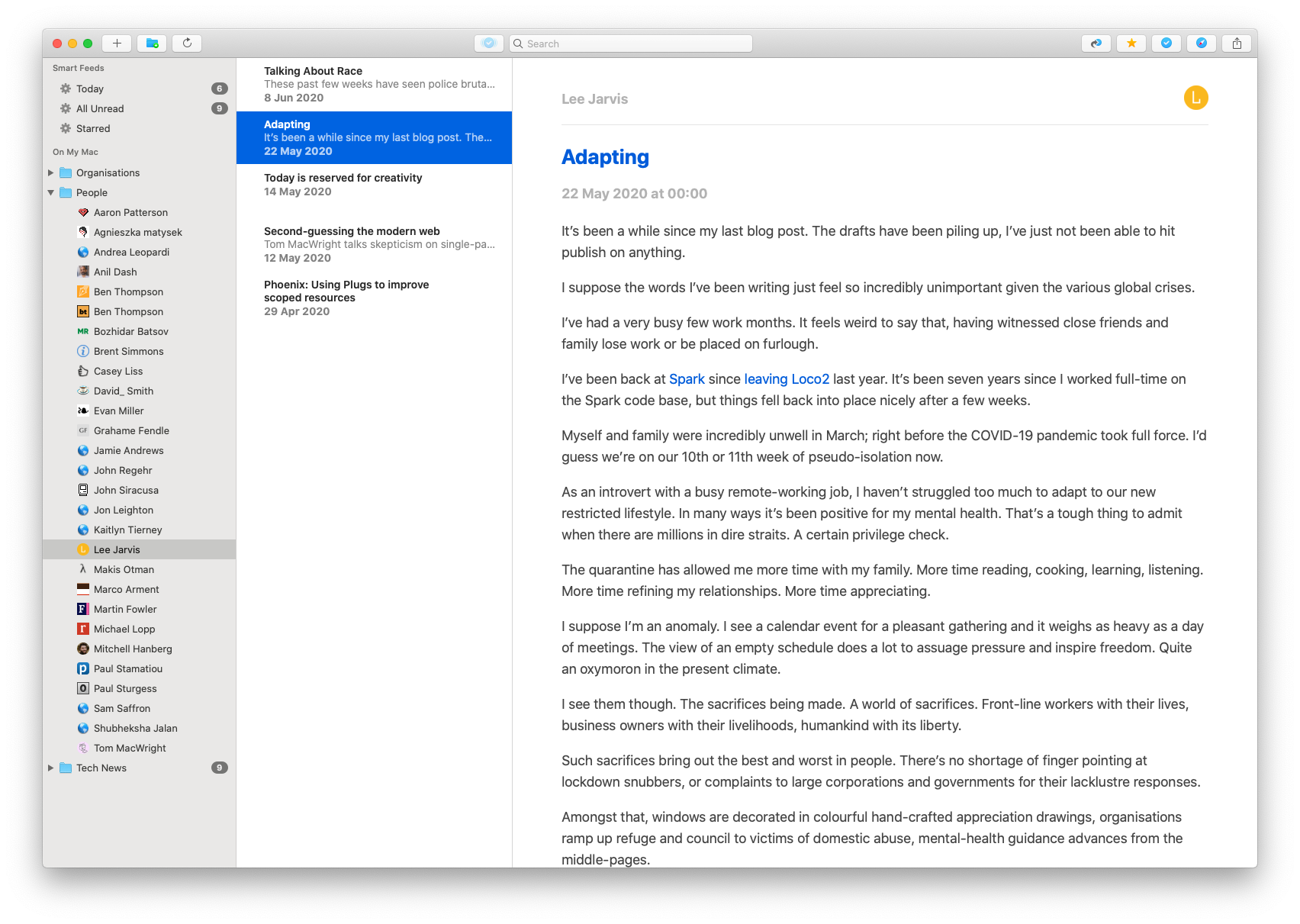
The hybrid application supports iOS, iPadOS and macOS. Here’s how it looks on my Mac:</p>
<p>
<a href="/images/posts/NetNewsWire.png">  <img src="/images/posts/NetNewsWire.png" alt="">
</a></p>
<p>
There are a couple of missing features you might expect from a modern RSS Reader. It doesn’t have any first-party sync support (Feedbin works, but I don’t use it). Right now I’m exporting my subscriptions to iCloud and then importing them in on my phone.</p>
<p>
I’d also like to see support for the ability to create smart-feeds with custom criteria for filtering articles. They have a very solid base though and the app is improving constantly.</p>
<p>
I’ve recently been finding it difficult to avoid sinking time into social media (where I often go for news and interesting articles), and it seems increasingly difficult to know who and what to trust. NetNewsWire provides a nice way for me to filter out the noise and make sure I see content from creators I care about. I highly recommend it.</p>
]]></content>
    <author>
      <name>Lee Jarvis</name>
      <uri>https://leejarvis.me/</uri>
    </author>
    <id>https://leejarvis.me/posts/2020/netnewswire</id>
    <title>NetNewsWire</title>
    <updated>2020-06-10T09:00:00Z</updated>
  </entry>
  <entry>
    <content type="html"><![CDATA[<p>
These past few weeks have seen police brutality erupt across the U.S. in response to the <a href="https://en.wikipedia.org/wiki/Killing_of_George_Floyd">murder of George Floyd</a> by Minneapolis Police Officers, and the ongoing <a href="https://blacklivesmatter.com">Black Lives Matter</a> movement.</p>
<p>
America might be in the spotlight, but make no mistake; systemic racism exists all across the globe and we in the U.K. are no less guilty of it.</p>
<p>
I’ve taken this as an opportunity to listen and learn. My first stop is the book <a href="https://www.goodreads.com/book/show/35099718-so-you-want-to-talk-about-race">So You Want to Talk About Race</a> by <a href="http://www.ijeomaoluo.com">Ijeoma Oluo</a> which I’m half way through so far (I recommend it).</p>
<p>
Here’s a few other books I’ve seen recommended by others:</p>
<ul>
  <li>
<a href="https://www.goodreads.com/book/show/43708708-white-fragility">White Fragility: Why It’s So Hard for White People to Talk About Racism</a> by <a href="https://robindiangelo.com">Robin DiAngelo</a>  </li>
  <li>
<a href="https://www.goodreads.com/book/show/6792458-the-new-jim-crow">The New Jim Crow: Mass Incarceration in the Age of Colorblindness</a> by <a href="https://www.goodreads.com/author/show/3051490.Michelle_Alexander">Michelle Alexander</a>  </li>
  <li>
<a href="https://www.goodreads.com/book/show/33606119-why-i-m-no-longer-talking-to-white-people-about-race">Why I’m No Longer Talking to White People About Race</a> by <a href="http://renieddolodge.co.uk">Reni Eddo-Lodge</a>  </li>
</ul>
<p>
I hope we can get better at Talking About Race. Because Black Lives Matter.</p>
]]></content>
    <author>
      <name>Lee Jarvis</name>
      <uri>https://leejarvis.me/</uri>
    </author>
    <id>https://leejarvis.me/posts/2020/talking-about-race</id>
    <title>Talking About Race</title>
    <updated>2020-06-08T09:00:00Z</updated>
  </entry>
  <entry>
    <content type="html"><![CDATA[<p>
It’s been a while since my last blog post. The drafts have been piling up, I’ve just not been able to hit publish on anything.</p>
<p>
I suppose the words I’ve been writing just feel so incredibly unimportant given the various global crises.</p>
<p>
I’ve had a very busy few work months. It feels weird to say that, having witnessed close friends and family lose work or be placed on furlough.</p>
<p>
I’ve been back at <a href="https://spark.re">Spark</a> since <a href="/posts/2019/leaving-loco2">leaving Loco2</a> last year. It’s been seven years since I worked full-time on the Spark code base, but things fell back into place nicely after a few weeks.</p>
<p>
Myself and family were incredibly unwell in March; right before the COVID-19 pandemic took full force. I’d guess we’re on our 10th or 11th week of pseudo-isolation now.</p>
<p>
As an introvert with a busy remote-working job, I haven’t struggled too much to adapt to our new restricted lifestyle. In many ways it’s been positive for my mental health. That’s a tough thing to admit when there are millions in dire straits. A certain privilege check.</p>
<p>
The quarantine has allowed me more time with my family. More time reading, cooking, learning, listening. More time refining my relationships. More time appreciating.</p>
<p>
I suppose I’m an anomaly. I see a calendar event for a pleasant gathering and it weighs as heavy as a day of meetings. The view of an empty schedule does a lot to assuage pressure and inspire freedom. Quite an oxymoron in the present climate.</p>
<p>
I see them though. The sacrifices being made. A world of sacrifices. Front-line workers with their lives, business owners with their livelihoods, humankind with its liberty.</p>
<p>
Such sacrifices bring out the best and worst in people. There’s no shortage of finger pointing at lockdown snubbers, or complaints to large corporations and governments for their lacklustre responses.</p>
<p>
Amongst that, windows are decorated in colourful hand-crafted appreciation drawings, organisations ramp up refuge and council to victims of domestic abuse, mental-health guidance advances from the middle-pages.</p>
<p>
We’re adapting; preparing ourselves for a new normal. A necessary change. Things won’t go back to the way they were. Not in my lifetime.</p>
<p>
But we’re adapting, because that’s what we do.</p>
]]></content>
    <author>
      <name>Lee Jarvis</name>
      <uri>https://leejarvis.me/</uri>
    </author>
    <id>https://leejarvis.me/posts/2020/adapting</id>
    <title>Adapting</title>
    <updated>2020-05-22T09:00:00Z</updated>
  </entry>
  <entry>
    <content type="html"><![CDATA[<p>
In this post I’m going to talk about creating a <a href="https://www.phoenixframework.org">Phoenix</a> web app. The application intends to create a scoped route with nested resources. If you don’t know what any of that means then this post <em>probably</em> isn’t for you.</p>
<h3>
The Goal</h3>
<p>
I want to create an application that supports a number of resources under a <code class="inline">project</code> scoping. I want every project to support the following:</p>
<ol>
  <li>
Users  </li>
  <li>
Posts + Comments  </li>
  <li>
Events  </li>
</ol>
<p>
Since all of these resources belong to the project scope, we need to create a sensible URL structure. Something like this should suffice:</p>
<pre><code class="elixir">/projects/{project_id}/users
/projects/{project_id}/users/{user_id}
/projects/{project_id}/posts
/projects/{project_id}/posts/{post_id}/comments
/projects/{project_id}/events
/projects/{project_id}/events/{event_id}</code></pre>
<p>
I’ve omitted some routes, but hopefully you get the point. Let’s jump in.</p>
<h3>
Scoped Routes</h3>
<p>
Firstly we need to update our router to support our project scoping. Fortunately Phoenix supports <a href="https://hexdocs.pm/phoenix/routing.html#scoped-routes">Scoped Routes</a> out of the box, so a straightforward change to our router will add this for us:</p>
<pre><code class="elixir">scope &quot;/projects/:project_id&quot; do
  get &quot;/&quot;, ProjectController, :show

  # resources here
end</code></pre>
<p>
Now if we run <code class="inline">mix phx.routes</code> we’ll see our project scoping:</p>
<pre><code>project_path  GET  /projects/:project_id  AppWeb.ProjectController :show</code></pre>
<h3>
Nested Resources</h3>
<p>
Next we’ll need to add the resources inside of our scoping to complete our URL structure:</p>
<pre><code class="elixir">scope &quot;/projects/:project_id&quot; do
  get &quot;/&quot;, ProjectController, :show

  resources &quot;/users&quot;, UserController
  resources &quot;/events&quot;, EventController
  resources &quot;/posts&quot;, PostController do
    resources &quot;/comments&quot;, CommentController
  end
end</code></pre>
<p>
And <code class="inline">mix phx.routes</code>:</p>
<pre><code>     project_path  GET     /projects/:project_id                                   AppWeb.ProjectController :show
        user_path  GET     /projects/:project_id/users                             AppWeb.UserController :index
        user_path  GET     /projects/:project_id/users/:id/edit                    AppWeb.UserController :edit
        user_path  GET     /projects/:project_id/users/new                         AppWeb.UserController :new
        user_path  GET     /projects/:project_id/users/:id                         AppWeb.UserController :show
        user_path  POST    /projects/:project_id/users                             AppWeb.UserController :create
        user_path  PATCH   /projects/:project_id/users/:id                         AppWeb.UserController :update
                   PUT     /projects/:project_id/users/:id                         AppWeb.UserController :update
        user_path  DELETE  /projects/:project_id/users/:id                         AppWeb.UserController :delete
       event_path  GET     /projects/:project_id/events                            AppWeb.EventController :index
       event_path  GET     /projects/:project_id/events/:id/edit                   AppWeb.EventController :edit
       event_path  GET     /projects/:project_id/events/new                        AppWeb.EventController :new
       event_path  GET     /projects/:project_id/events/:id                        AppWeb.EventController :show
       event_path  POST    /projects/:project_id/events                            AppWeb.EventController :create
       event_path  PATCH   /projects/:project_id/events/:id                        AppWeb.EventController :update
                   PUT     /projects/:project_id/events/:id                        AppWeb.EventController :update
       event_path  DELETE  /projects/:project_id/events/:id                        AppWeb.EventController :delete
        post_path  GET     /projects/:project_id/posts                             AppWeb.PostController :index
        post_path  GET     /projects/:project_id/posts/:id/edit                    AppWeb.PostController :edit
        post_path  GET     /projects/:project_id/posts/new                         AppWeb.PostController :new
        post_path  GET     /projects/:project_id/posts/:id                         AppWeb.PostController :show
        post_path  POST    /projects/:project_id/posts                             AppWeb.PostController :create
        post_path  PATCH   /projects/:project_id/posts/:id                         AppWeb.PostController :update
                   PUT     /projects/:project_id/posts/:id                         AppWeb.PostController :update
        post_path  DELETE  /projects/:project_id/posts/:id                         AppWeb.PostController :delete
post_comment_path  GET     /projects/:project_id/posts/:post_id/comments           AppWeb.CommentController :index
post_comment_path  GET     /projects/:project_id/posts/:post_id/comments/:id/edit  AppWeb.CommentController :edit
post_comment_path  GET     /projects/:project_id/posts/:post_id/comments/new       AppWeb.CommentController :new
post_comment_path  GET     /projects/:project_id/posts/:post_id/comments/:id       AppWeb.CommentController :show
post_comment_path  POST    /projects/:project_id/posts/:post_id/comments           AppWeb.CommentController :create
post_comment_path  PATCH   /projects/:project_id/posts/:post_id/comments/:id       AppWeb.CommentController :update
                   PUT     /projects/:project_id/posts/:post_id/comments/:id       AppWeb.CommentController :update
post_comment_path  DELETE  /projects/:project_id/posts/:post_id/comments/:id       AppWeb.CommentController :delete</code></pre>
<p>
Excellent, this is exactly what we want. Let’s take a peek at our comments controller:</p>
<pre><code class="elixir">defmodule AppWeb.CommentController do
  use AppWeb, :controller

  def index(conn, %{&quot;project_id&quot; =&gt; project_id, &quot;post_id&quot; =&gt; post_id}) do
    render(conn, &quot;index.html&quot;, comments: list_comments(project_id, post_id))
  end

  def show(conn, %{&quot;project_id&quot; =&gt; project_id, &quot;post_id&quot; =&gt; post_id, &quot;id&quot; =&gt; comment_id}) do
    render(conn, &quot;show.html&quot;, comment: get_comment!(project_id, post_id, comment_id))
  end
end</code></pre>
<p>
OK, it’s not <em>bad</em>, but one thing is very clear: every one of our controller actions are going to need to handle this <code class="inline">project_id</code> parameter.</p>
<p>
I come from a Rails background, and the canonical way to solve this in Rails is to add a <code class="inline">before_action</code>:</p>
<pre><code class="ruby">class CommentController
  before_action :set_project

  # actions

  def set_project
    @project = Project.find(params[:project_id])
  end
end</code></pre>
<p>
We can’t do this in Phoenix.</p>
<h3>
Enter Plug</h3>
<p>
However, Phoenix supports <a href="https://hexdocs.pm/plug/readme.html">Plug</a>. Plug is an Elixir library that implements a specification for composable modules to be used in web applications. Phoenix uses Plug heavily under the hood (in fact, Phoenix controllers themselves implement the Plug behaviour).</p>
<p>
Our Phoenix controllers expose a helpful function named <code class="inline">plug</code> that allows us to implement behaviour similar to our <code class="inline">before_action</code>:</p>
<pre><code class="elixir">defmodule AppWeb.CommentController do
  use AppWeb, :controller

  plug :put_project

  def show(conn, %{&quot;post_id&quot; =&gt; post_id, &quot;id&quot; =&gt; comment_id}) do
    %{current_project: project} = conn.assigns
    render(conn, &quot;show.html&quot;, comment: get_comment!(project, post_id, comment_id))
  end

  defp put_project(conn, _opts) do
    current_project = fetch_current_project(conn.params[&quot;project_id&quot;])
    assign(conn, :current_project, current_project)
  end
end</code></pre>
<p>
This code is pretty straightforward. <code class="inline">put_project/2</code> is called before our action is executed, and we put the current project into <code class="inline">conn.assigns</code> (a storage mechanism provided to us by Plug). Now we can use this function in all of our project-scoped controllers to remove the <code class="inline">%{&quot;project_id&quot; =&gt; project_id}</code> matches.</p>
<p>
This is nice, but we can go one step further and move this functionality into our router using pipelines.</p>
<h3>
Pipelines</h3>
<p>
Phoenix supports something called <a href="https://hexdocs.pm/phoenix/routing.html#pipelines">Pipelines</a>. Pipelines allow us to attach a series of plugs to a scope. Let’s add a new pipeline for our project scoping:</p>
<pre><code class="elixir">pipeline :project do
  # plug :authenticate_user
  plug AppWeb.CurrentProject
end

scope &quot;/projects/:project_id&quot; do
  pipe_through :project

  get &quot;/&quot;, ProjectController, :show

  # ...
end</code></pre>
<p>
And define <code class="inline">AppWeb.CurrentProject</code> like so:</p>
<pre><code class="elixir">defmodule AppWeb.CurrentProject do
  @moduledoc &quot;&quot;&quot;
  This module implements functionality to fetch the current project
  from the URL and add it to Conn.assigns, making it available to any
  controller within the project scope.
  &quot;&quot;&quot;

  @behaviour Plug

  import Plug.Conn
  import Phoenix.Controller

  @assigns_key :current_project

  def init(opts), do: opts

  def call(%Plug.Conn{params: %{&quot;project_id&quot; =&gt; id}} = conn, _opts) do
    assign(conn, @assigns_key, get_project!(id))
  end

  defp get_project!(id) do
    # fetch project from database
  end
end</code></pre>
<p>
There we have it. All of our project-scoped controllers will be able to fetch the current project from <code class="inline">conn.assigns</code> without having to add any controller-specific code.</p>
<h3>
Bonus: Nested Layouts</h3>
<p>
By default, Phoenix wraps all of our views in the layout defined in <code class="inline">templates/layout/app.html.eex</code>. This layout template contains an assign named <code class="inline">@inner_content</code> which, as you’d expect, returns the content of our view templates.</p>
<p>
I want users to see a familiar project-based UI in all of our scoped pages. I don’t want to have to create a new app layout because it’s going to contain a lot of duplicate code. Similarly, I don’t want to have to add a bunch of conditional statements inside of <code class="inline">app.html.eex</code> that add content based on whether we’re inside the project-scoping.</p>
<p>
What I really want is a nested layout: <code class="inline">app.html.eex &gt; project.html.eex &gt; our view template</code>.</p>
<p>
Thankfully Phoenix has our backs on this and provides <a href="https://hexdocs.pm/phoenix/Phoenix.Controller.html#put_root_layout/2"><code class="inline">Phoenix.Controller.put_root_layout/2</code></a></p>
<p>
Let’s tweak our <code class="inline">AppWeb.CurrentProject</code> plug:</p>
<pre><code class="elixir">def call(%Plug.Conn{params: %{&quot;project_id&quot; =&gt; id}} = conn, _opts) do
  conn
  |&gt; put_layout({AppWeb.ProjectView, &quot;layout.html&quot;})
  |&gt; put_root_layout({AppWeb.LayoutView, &quot;app.html&quot;})
  |&gt; assign(@assigns_key, get_project!(id))
end

defp get_project!(id)
  # fetch project from database
end</code></pre>
<p>
And create a new file in <code class="inline">templates/project/layout.html.eex</code> with the following content:</p>
<pre><code class="erb">&lt;h1&gt;&lt;%= @current_project.name %&gt;&lt;/h1&gt;
&lt;div class=&quot;project-content&quot;&gt;
  &lt;%= @inner_content %&gt;
&lt;/div&gt;</code></pre>
<p>
And that’s it. All of our project-scopes view templates will be rendered inside of this layout.</p>
<hr class="thin">
<p>
Have any suggestions for improving this post? <a href="https://bsky.app/profile/lee.jrvs.uk">Let me know</a>.</p>
]]></content>
    <author>
      <name>Lee Jarvis</name>
      <uri>https://leejarvis.me/</uri>
    </author>
    <id>https://leejarvis.me/posts/2020/phoenix-simplify-nested-resources</id>
    <title>Phoenix: Using Plugs to improve scoped resources</title>
    <updated>2020-04-29T09:00:00Z</updated>
  </entry>
  <entry>
    <content type="html"><![CDATA[<p>
I’ve been dealing with a myriad of problems since upgrading macOS to <a href="https://www.apple.com/macos/catalina/">Catalina</a> a few months ago.</p>
<p>
None are worse though than my bluetooth devices disconnecting 3-4 times each day, leaving me without mouse, keyboard and headphone connectivity until it rights itself after one or two minutes.</p>
<p>
I spent the first few days Googling and considered rolling back to an earlier version of macOS. Eventually I figured it would probably just fix itself soon. Nope, not yet. This dropping connection has instead become part of my environment; it’ll disconnect, I’ll stare at an unresponsive display for a minute and then continue with my day.</p>
<p>
Disconnect, wait, continue, repeat.</p>
<h3>
Logitech</h3>
<p>
I <a href="/posts/2019/gear-2019">use</a> a <a href="https://www.logitech.com/en-ph/product/mx-master-2s-flow">Logitech MX Master 2S</a> alongside an Apple Magic Keyboard. The keyboard problem is fixed fairly easily; I can plug it in. I prefer a wireless keyboard for aesthetics, but I care more about not losing my mind so this was an easy decision to make.</p>
<p>
Unlike the Apple Magic Mouse (which requires stabbing in the underbelly with a USB cable in order to provide power—a breathtaking design choice), the MX Master sensibly sticks a USB port right on its bow. I don’t want to use a wired mouse though. The drag is annoying, the extra moving cables are annoying and dammit why am I even having to consider this?</p>
<p>
Those of you accustomed to wireless Logitech peripherals will know about the little USB dongle they pack into the box. You know, the third-party wireless receiver that goes straight into the bin after unpacking? They call it a Unifying USB Receiver. It looks like this:</p>
<p>
  <img src="/images/posts/usb-unifying-receiver.png" alt="">
</p>
<h3>
People use this?</h3>
<p>
Well, I recently learned that people actually use (and like!) this thing. Recent episodes of <a href="http://atp.fm">Accidental Tech Podcast</a> and videos from <a href="https://www.youtube.com/user/marquesbrownlee">MKBHD</a> showed clear preference for using this over a bluetooth connection.</p>
<p>
I couldn’t fathom why, so I tried it.</p>
<p>
Low and behold, the IR connection to this dongle is <em>significantly</em> better that my existing bluetooth connection. Whilst I’d noticed input lag and jankiness from time to time, I had never considered the bluetooth connection being an issue (it’s a pretty tried and tested technology, after all).</p>
<p>
It’s been a week and the USB receiver seems to be as solid as a wired connection. Not only that, but the wireless bluetooth connection to my headphones has not dropped once since.</p>
<p>
So thanks, Logitech. I’m happy you’re occupying one of my few USB ports.</p>
]]></content>
    <author>
      <name>Lee Jarvis</name>
      <uri>https://leejarvis.me/</uri>
    </author>
    <id>https://leejarvis.me/posts/2020/logitech-usb-receiver</id>
    <title>The Logitech USB Receiver</title>
    <updated>2020-01-22T09:00:00Z</updated>
  </entry>
  <entry>
    <content type="html"><![CDATA[<p>
I spent most of 2018/19 in a total state of burnout. Exhausted, overwhelmed and stressed.</p>
<p>
I’m writing this story—my story—as a tale of caution, aimed directly at future me. Maybe you’ll find something here for you too.</p>
<h3>
Symptoms</h3>
<p>
I thought I’d understood burnout. I’d seen it before; felt it before. I considered myself suitably cautioned to the impact it could have on my life. I wouldn’t be burnt again. Not me.</p>
<p>
The early stages of burnout are rarely obvious. I had a busy and important job. I had 10+ direct reports and a lot to prove. The business was scaling up quickly and trying to handle a new management structure. Feeling a bit overwhelmed or anxious just comes with the territory. Part of the job, some might say.</p>
<p>
And yeah maybe my patience slipped a little at times. And perhaps I made one or two rash decisions. I’m only human.</p>
<p>
And what if you disappoint one person? You’re helping ten others. 9/10 seems like a pretty good success rate to me. You’ll make it up to them later, anyway.</p>
<p>
And don’t feel bad if you’re not excited for the seventh call of the day. It’s a 1:1 with someone you’ve been working with for years. How important can it be?</p>
<p>
The symptoms of burnout differ from person to person, but there’s usually a common theme: you feel overwhelmed and you’re less effective at your job.</p>
<p>
When I feel like this, a day with an empty todo list becomes just as stressful as a day full of tasks. I become completely overwhelmed by nothingness.</p>
<p>
The small things matter. Whilst it’s perfectly normal—common in fact—to have an off-day, it’s important to take a step back from time to time and analyse your work life from top to bottom.</p>
<h3>
Cause</h3>
<p>
Time for some hard honesty. This burnout was directly caused by overloading myself with responsibilities whilst working as VP of Engineering at Loco2. I realised it long before leaving, and failed to correct the damage. This was one of five reasons <a href="https://lee.jrvs.uk/posts/2019/leaving-loco2">I decided to leave</a> (perhaps I’ll talk about the others in future).</p>
<p>
I’ve never had a problem with saying no to people if I believe something isn’t a good idea. I consider this an important skill of a good leader and manager. But you know what’s <em>really</em> hard to say no to? Helping people.</p>
<p>
If I can spend 5 minutes on a job that might save you 10, we’re at a net win. You’re happy, I’m happy that you’re happy, and the company is happy. Happy.</p>
<p>
But what happens when you don’t have those 5 minutes? Well, you help anyway and then you eventually write a blog post like this.</p>
<p>
I was fortunate enough to be surrounded by kind people. Not a single one of them would have piled on had they known how I was feeling; had I told them. Whilst there was a distinct lack of support from the senior management team, my peers would have gone out of their way to help.</p>
<p>
This might sound like a load of self-pity, but I really could and should have done more to make things easier on myself. This is something I’m really trying hard to get better at.</p>
<p>
Organisations don’t get away scot-free though. The mental wellbeing of employees is seldom regarded of critical importance. An unnecessary pitstop on the path to success. And what is out there is often reactive; better than nothing, but often too late. Organisations are really pissing away money by not solving this proactively.</p>
<p>
Being part of a post-acquisition company that’s losing some of it’s longest serving staff is difficult. There’s a new level of reliance and pressure on the “original” or pre-acquisition staff. Meanwhile senior management are crossing their fingers and hoping the pressure doesn’t send their employees insane. Or, at least, that someone else is there to pick up the pieces when the inevitable happens.</p>
<h3>
Effect</h3>
<p>
Burnout can have a profound impact on every facet of your life. I found myself working significantly more and achieving significantly less. The extra hours of work replaced time I would usually go to the gym, work on side-projects or spend time with family.</p>
<p>
None of my contributions felt fulfilling. I was somehow bored by monotony and overpowered by new stresses, all at the same time. I started getting severe headaches and stomach pains.</p>
<p>
Doing <em>anything</em> felt exhausting and overwhelming. I doubted myself as a manager (amongst other things) and became increasingly isolated. I continued taking on more responsibilities in an attempt to feel helpful; and there begins the compounding effect.</p>
<h3>
Recovery</h3>
<p>
They say that every cloud has a silver lining. I think that’s bullshit, but I learnt a lot about myself during this time. I learnt about the sort of environment I really want to work in and the sort of things I really want to spend my time working on.</p>
<p>
I took some time to reevaluate my priorities and made decisions accordingly. I set more boundaries and took a long break from social media (which is still somewhat in progress).</p>
<p>
I replaced hours of frustration with walks, worked on interesting side-projects and handed off a bunch of responsibilities to others (I was fortunate to have a few people who noticed my struggling and forced my hand in this—I am indebted to them).</p>
<p>
As a result, I worked less and, perhaps unsurprisingly, started achieving more again. I also <a href="/posts/2019/fatherhood">became a father</a>, which does a lot to put life into perspective—though I don’t recommend that as your first step to resolving burnout.</p>
<p>
If nothing else, take this as a reminder to look after yourself. Lean on other people, they’re more willing to help than you think. Focus on your mental wellbeing just as much as your physical health. Analyse yourself and your surroundings every now and then, and never be afraid to ask yourself whether you’re truly happy or not.</p>
]]></content>
    <author>
      <name>Lee Jarvis</name>
      <uri>https://leejarvis.me/</uri>
    </author>
    <id>https://leejarvis.me/posts/2020/burnout</id>
    <title>Burnout</title>
    <updated>2020-01-08T09:00:00Z</updated>
  </entry>
  <entry>
    <content type="html"><![CDATA[<p>
<a href="https://adventofcode.com">Advent of Code</a> is an advent calendar of small programming puzzles for a variety of skill sets that can be solved in any programming language.</p>
<p>
Each year since 2015, Advent of Code has created 25 small programming challenges for the days leading up to Christmas. Each challenge has two parts, the second of which is unlocked after completing the first. The challenges increase in difficulty as Christmas Day closes in and the final puzzle is posted on Christmas morning, in case you fancy foregoing breakfast with the family in a race to the leaderboard.</p>
<p>
Advent of Code is great for people who want to:</p>
<ol>
  <li>
Learn a new programming language  </li>
  <li>
Learn new skills  </li>
  <li>
Sharpen existing skills  </li>
  <li>
Challenge themselves (and others)  </li>
</ol>
<p>
All previous Advent of Code events are available on their website, so you can jump into more than 100 interesting puzzles of varying difficulty:</p>
<ul>
  <li>
<a href="https://adventofcode.com/2015">2015</a>  </li>
  <li>
<a href="https://adventofcode.com/2016">2016</a>  </li>
  <li>
<a href="https://adventofcode.com/2017">2017</a>  </li>
  <li>
<a href="https://adventofcode.com/2018">2018</a>  </li>
</ul>
<p>
Oh and in case you wonder what it takes to achieve the leaderboard, check out <a href="https://www.youtube.com/watch?v=Hgv6d6rrQxo&list=PLZhotmgEsCQM_p8bqiGtvBJayKOxcmSWi">Jonathan Paulson’s speed solving of the 2018 event challenges on YouTube</a> 🤯</p>
<p>
If you enjoy the puzzles and have the means to, I urge you to <a href="https://adventofcode.com/2019/support">contribute</a> in the ongoing building and running of Advent of Code. I can’t imagine the work that goes into building these creative puzzles, and I’m really excited for the 2019 event.</p>
]]></content>
    <author>
      <name>Lee Jarvis</name>
      <uri>https://leejarvis.me/</uri>
    </author>
    <id>https://leejarvis.me/posts/2019/advent-of-code</id>
    <title>Advent of Code</title>
    <updated>2019-11-27T09:00:00Z</updated>
  </entry>
  <entry>
    <content type="html"><![CDATA[<p>
Earlier this year, after the <a href="/posts/2019/wwdc19">WWDC keynote</a> announcements,
I wrote about <a href="/posts/2019/swiftui-scrollviews">SwiftUI ScrollViews</a>. This was
my first foray into the world of SwiftUI. And since then, things have changed
quite a lot.</p>
<p>
For the many who picked up Swift when it was still young, the fast changes
to the SwiftUI implementation won’t come as a surprise. For a lot of us, though,
the opaque changes and lack of documentation are immensely frustrating.</p>
<p>
In this post I’ll continue with a variation of the ScrollView application
previously posted, and implement some State and Binding properties to
allow the application to respond to changes in state.</p>
<p>
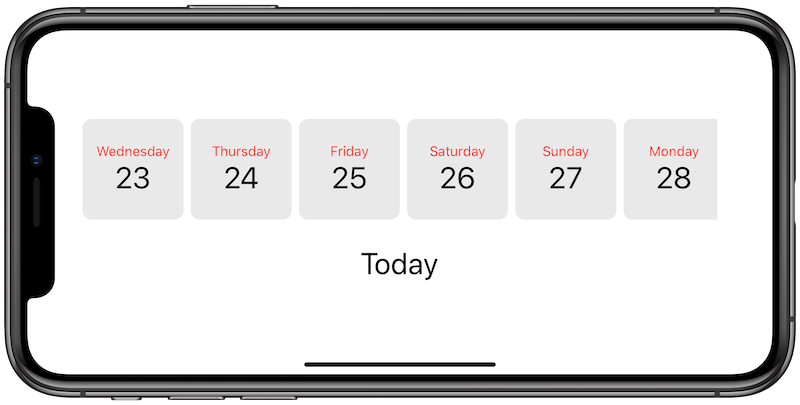
Our current app looks something like this:</p>
<p>
  <img src="/images/posts/swiftui-bindings-first-landscape.png" alt="">
</p>
<p>
The date cards are displayed in a ScrollView much life the gift items in our
previous app. Here’s the complete code:</p>
<pre><code class="swift">import SwiftUI

let lightGrey = Color(#colorLiteral(red: 0.9160255393, green: 0.9160255393, blue: 0.9160255393, alpha: 1))

struct ContentView: View {
    var dates: [Date] {
        (0...10).map { offset in
            Calendar.current.date(byAdding: .day, value: offset, to: Date()) ?? Date()
        }
    }

    var body: some View {
        VStack {
            ScrollView(.horizontal, showsIndicators: false) {
                HStack {
                    ForEach(dates, id: \.self) { date in
                        DayView(date: date)
                    }
                }
            }
            .padding()
            SelectedDayView()
        }
    }
}

struct DayView: View {
    var date: Date
    let size: CGFloat = 110

    var body: some View {
        VStack {
            Text(dayName).font(.system(.callout)).foregroundColor(Color.red)
            Text(dayNumber).font(.system(.largeTitle))
        }
        .frame(width: size, height: size)
        .background(lightGrey)
        .cornerRadius(10)
    }

    var dayName: String { return formatDate(&quot;EEEE&quot;) }
    var dayNumber: String { return formatDate(&quot;d&quot;) }

    func formatDate(_ format: String) -&gt; String {
        let dateFormatterGet = DateFormatter()
        dateFormatterGet.dateFormat = format

        return dateFormatterGet.string(from: date)
    }
}

struct SelectedDayView: View {
    var body: some View {
        Text(&quot;Today&quot;)
            .font(.system(.largeTitle))
    }
}

struct ContentView_Previews: PreviewProvider {
    static var previews: some View {
        ContentView()
    }
}</code></pre>
<hr class="thin">
<p>
As you can see, it’s pretty straightforward. We create 10 Date objects
(starting from Today), and put them inside a ScrollView. Each date object
is wrapped in a DayView that’s designed to encapsulate the style and
functional behaviour of our day views.</p>
<p>
We have a label below with the static text “Today”. You probably guessed
where this was going: We want to update this label when the user clicks
on one of the dates.</p>
<p>
In classic UIKit, you would achieve this by doing something like:</p>
<ol>
  <li>
Add a UITapGestureRecognizer to our day views  </li>
  <li>
Implement a target function that is executed when the tap event occurs  </li>
  <li>
Add @IBOutlet to our day view and labels  </li>
  <li>
Update the label inside our tap function  </li>
</ol>
<p>
There’s nothing wrong with this flow. It’s distinctively imperative,
and that’s not exactly a bad thing. Things are a little different
in SwiftUI, though.</p>
<h3>
Enter @State and @Binding</h3>
<p>
The declarative nature of SwiftUI means we have to change our way of
thinking a little. Our steps turn into something like this:</p>
<ol>
  <li>
Add a tap gesture to our day view  </li>
  <li>
Update the currently selected date when the tap event occurs  </li>
  <li>
Create a Binding to this value to keep the label updated  </li>
</ol>
<p>
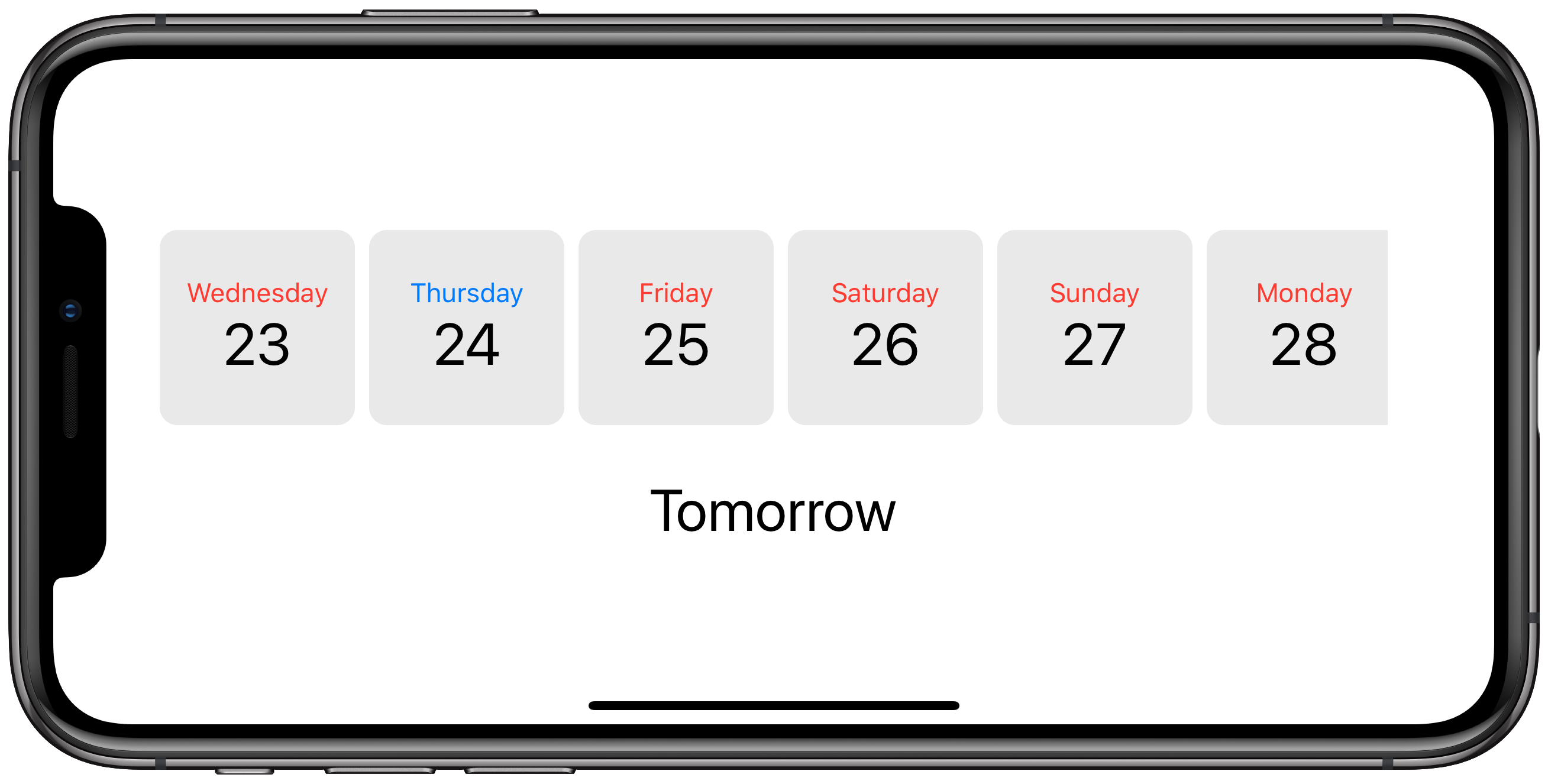
This is what we’re after:</p>
<p>
  <img src="/images/posts/swiftui-bindings-final-landscape.png" alt="">
</p>
<p>
Ideally, our ContentView would be responsible for holding the
value of the currently selected date, and the child views would
be given access to read and write this date in order to update
the view.</p>
<p>
This is exactly what the @State and @Binding property wrappers give
us. Let’s work through the steps.</p>
<p>
Firstly, we need to add a <a href="https://developer.apple.com/documentation/swiftui/state">State property</a>
to our ContentView to store the currently selected date:</p>
<pre><code class="swift">struct ContentView: View {
    @State private var selectedDate: Date
}</code></pre>
<p>
Then add <a href="https://developer.apple.com/documentation/swiftui/binding">Binding properties</a>
to our child views:</p>
<pre><code class="swift">struct DayView: View {
    @Binding var selectedDate: Date
}

struct SelectedDayView: View {
    @Binding var selectedDate: Date
}</code></pre>
<p>
Then of course, we must pass the currently selected date into
the child views. To do this, we apply the <code class="inline">$</code> prefix to our
selectedDate property, which returns a <a href="https://developer.apple.com/documentation/swiftui/binding">Binding</a>:</p>
<pre><code class="swift">DayView(date: date, selectedDate: self.$selectedDate)
SelectedDayView(selectedDate: $selectedDate)</code></pre>
<p>
This change tells our child views that they must be re-rendered
when the state of this property changes. It also allows the views
to update the state (and as you’ll see below, that’s exactly what
we do in onTapGesture).</p>
<p>
Here’s the full code:</p>
<pre><code class="swift">import SwiftUI

let lightGrey = Color(#colorLiteral(red: 0.9160255393, green: 0.9160255393, blue: 0.9160255393, alpha: 1))

let dates: [Date] = {
    (0...10).map { offset in
        Calendar.current.date(byAdding: .day, value: offset, to: Date()) ?? Date()
    }
}()

func formatDate(_ date: Date, format: String) -&gt; String {
    let dateFormatterGet = DateFormatter()
    dateFormatterGet.dateFormat = format

    return dateFormatterGet.string(from: date)
}

struct ContentView: View {
    @State private var selectedDate: Date

    var body: some View {
        VStack {
            ScrollView(.horizontal, showsIndicators: false) {
                HStack {
                    ForEach(dates, id: \.self) { date in
                        DayView(date: date, selectedDate: self.$selectedDate)
                    }
                }
            }
            .padding()
            SelectedDayView(selectedDate: $selectedDate)
        }
    }
}

struct DayView: View {
    var date: Date
    let size: CGFloat = 110

    @Binding var selectedDate: Date

    var isSelected: Bool { selectedDate == date }

    var body: some View {
        VStack {
            Text(dayName).font(.system(.callout)).foregroundColor(isSelected ? Color.blue : Color.red)
            Text(dayNumber).font(.system(.largeTitle))
        }
        .frame(width: size, height: size)
        .background(lightGrey)
        .cornerRadius(10)
        .onTapGesture { self.selectedDate = self.date }
    }

    var dayName: String { return formatDate(date, format: &quot;EEEE&quot;) }
    var dayNumber: String { return formatDate(date, format: &quot;d&quot;) }
}

struct SelectedDayView: View {
    @Binding var selectedDate: Date

    var body: some View {
        Text(dayName).font(.system(.largeTitle))
    }

    var dayName: String {
        if Calendar.current.isDateInToday(selectedDate) {
            return &quot;Today&quot;
        } else if Calendar.current.isDateInTomorrow(selectedDate) {
            return &quot;Tomorrow&quot;
        } else {
            return formatDate(selectedDate, format: &quot;EEEE&quot;)
        }
    }
}

struct ContentView_Previews: PreviewProvider {
    static var previews: some View {
        ContentView(selectedDate: dates.first!)
    }
}</code></pre>
<p>
Note that our ContentView now requires the property selectedDate to
be defined, so we must make sure this value is set inside our
ContentView_Previews and SceneDelegate.</p>
<hr class="thin">
<p>
Binding and State properties are crucial parts of even the simplest
of apps, and you’ll quickly find yourself wanting more as the
complexity and feature set of your app grows. This is where you’ll
want to turn to the
<a href="https://developer.apple.com/documentation/combine/">Combine framework</a>
and
<a href="https://developer.apple.com/documentation/combine/observableobject">ObservableObjects</a>.</p>
<p>
I’ll talk more about that in another post.</p>
]]></content>
    <author>
      <name>Lee Jarvis</name>
      <uri>https://leejarvis.me/</uri>
    </author>
    <id>https://leejarvis.me/posts/2019/swiftui-bindings</id>
    <title>SwiftUI Bindings</title>
    <updated>2019-11-20T09:00:00Z</updated>
  </entry>
  <entry>
    <content type="html"><![CDATA[<p>
This website is built using <a href="https://jekyllrb.com">Jekyll</a>, a static
website builder written in Ruby.</p>
<p>
There’s a lot of static website builders
out there. I picked Jekyll because it’s easy to use and extend (in
Ruby), and is supported by both
<a href="http://pages.github.com">GitHub Pages</a> and
<a href="http://netlify.com">Netlify</a>, the latter
of which is used to host this website.</p>
<p>
I recently added an <a href="/posts/archive">Archive page</a> to show a list of posts
grouped by year. There’s a number of ways you can do this, and I’ve seen
many hacky implementations on Stack Overflow. Thankfully it’s
actually pretty easy.</p>
<p>
Jekyll 3.4.0 introduced the <code class="inline">group_by_exp</code>
<a href="https://jekyllrb.com/docs/liquid/filters/">Liquid Filter</a>, allowing us to
group our posts according to the expression we pass as an argument. This
argument is itself a Liquid expression, allowing us to re-use Liquid filters.</p>
<p>
Here’s how to group our posts by year:</p>
<p>
{% raw %}</p>
<pre><code class="liquid">{% assign grouped_posts = site.posts | group_by_exp: &quot;post&quot;, &quot;post.date | date: &#39;%Y&#39;&quot; %}
{% for year in grouped_posts %}
  &lt;strong&gt;{{ year.name }}&lt;/strong&gt;
  &lt;ul&gt;
    {% for post in year.items %}
      &lt;li&gt;{{ post.title }}&lt;/li&gt;
    {% endfor %}
  &lt;/ul&gt;
{% endfor %}</code></pre>
<p>
{% endraw %}</p>
<p>
We can even repeat our grouping inside the loop to include per-month
subheadings:</p>
<p>
{% raw %}</p>
<pre><code class="liquid">{% assign grouped_by_year = site.posts | group_by_exp: &quot;post&quot;, &quot;post.date | date: &#39;%Y&#39;&quot; %}
{% for year in grouped_by_year %}
  &lt;strong&gt;{{ year.name }}&lt;/strong&gt;
  {% assign grouped_by_month = year.items | group_by_exp: &quot;post&quot;, &quot;post.date | date: &#39;%B&#39;&quot; %}
  {% for month in grouped_by_month %}
    &lt;strong&gt;{{ month.name }}&lt;/strong&gt;
    &lt;ul&gt;
      {% for post in month.items %}
        &lt;li&gt;{{ post.title }}&lt;/li&gt;
      {% endfor %}
    &lt;/ul&gt;
  {% endfor %}
{% endfor %}</code></pre>
<p>
{% endraw %}</p>
<p>
Whilst I’m not a huge fan of the Liquid syntax, Jekyll includes a number of really
convenient filters. It’s worth checking out their <a href="https://jekyllrb.com/docs/liquid/filters/">list</a>
when creating these sorts of pages.</p>
]]></content>
    <author>
      <name>Lee Jarvis</name>
      <uri>https://leejarvis.me/</uri>
    </author>
    <id>https://leejarvis.me/posts/2019/creating-an-archive-page-with-jekyll</id>
    <title>Creating an Archive page with Jekyll</title>
    <updated>2019-10-20T09:00:00Z</updated>
  </entry>
  <entry>
    <content type="html"><![CDATA[<p>
<a href="https://capistranorb.com">Capistrano</a> is a very popular deployment tool written in Ruby.
If you’ve deployed Ruby or Rails applications, chances are you’ve heard of it even if
you haven’t had the chance to use it.</p>
<p>
Capistrano was a crucial part of our deployment process at <a href="https://loco2.com">Loco2</a> long before
<a href="https://www.jonathanleighton.com/articles/2016/loco2-infrastructure-overhaul/">overhauling our hosting infrastructure</a>
with Terraform and Docker.</p>
<p>
Having <a href="/posts/2019/leaving-loco2">recently left Loco2</a>, I found myself back on a
project that uses Capistrano. As powerful as it is, it frustratingly doesn’t
include support for interactive shells. Whilst this is <a href="https://capistranorb.com/documentation/advanced-features/ptys/">by design</a>,
it’s a bit annoying if you want to boot a rails console or run another command
that allows input from the user.</p>
<p>
After doing some Googling I managed to piece together something that calls <code class="inline">ssh</code>
directly, allowing us to run a command in an interactive shell:</p>
<pre><code class="ruby">namespace :rails do
  desc &quot;Start a rails console&quot;
  task :console do
    exec_interactive(&quot;rails console&quot;)
  end

  desc &quot;Start a rails dbconsole&quot;
  task :dbconsole do
    exec_interactive(&quot;rails dbconsole&quot;)
  end

  def exec_interactive(command)
    host = primary(:web).hostname
    env = &quot;RAILS_ENV=#{fetch(:rails_env)}&quot; # add other ENV variables
    command = &quot;cd #{release_path}; #{env} bundle exec #{command}&quot;

    puts &quot;Running command on #{host}:&quot;
    puts &quot;  #{command}\n\n&quot;

    exec %(ssh #{host} -t &quot;sh -c &#39;#{command}&#39;&quot;)
  end
end</code></pre>
<p>
The <code class="inline">primary(:web).hostname</code> just fetches the hostname for the first/primary web
host. It’s worth mentioning this because it <em>might</em> not be desirable. You could
quite easily fetch all of the remote hosts and provide a menu that allows the
user to select the host they want to connect to. For my purposes though, I just
wanted to run a rails console without having a custom script that fetched
our hostname via the AWS command line tools.</p>
<p>
You may want to consider safeguarding production access by adding a warning
message when <code class="inline">fetch(:rails_env) == &quot;production&quot;</code>, or perhaps add
the <code class="inline">--sandbox</code> option to protect your data.</p>
<p>
I believe developers should be trusted to have direct access to all live
environments, including production. These sorts of small convenience scripts
really help to avoid friction when troubleshooting or debugging data issues on
non-local environments.</p>
]]></content>
    <author>
      <name>Lee Jarvis</name>
      <uri>https://leejarvis.me/</uri>
    </author>
    <id>https://leejarvis.me/posts/2019/interactive-shells-in-capistrano</id>
    <title>Interactive Shells in Capistrano</title>
    <updated>2019-10-14T09:00:00Z</updated>
  </entry>
  <entry>
    <content type="html"><![CDATA[<p>
My wife and I welcomed our daughter into the world on 17 August. I’ve
since learned a few things:</p>
<ul>
  <li>
Watching TV shows in 10-minute stints is difficult. What is a movie?  </li>
  <li>
Reheated coffee is not for me ☕️  </li>
  <li>
<em>All</em> old people think it’s OK to touch my kid. Hands off, Margaret  </li>
  <li>
I’m actually sleeping more (exhaustion really helps combat that pesky insomnia)  </li>
  <li>
I take way more photos than I ever thought I would 📷  </li>
  <li>
Alarm clock, meet bin  </li>
  <li>
Nappies. Lots of Nappies.  </li>
  <li>
Please stop making that noise  </li>
  <li>
Oh god please make some sort of noise 😱  </li>
  <li>
Single parents are super-human. Twins? No thanks.  </li>
  <li>
2 weeks statutory paternity leave is a disgrace (I got 4, it wasn’t enough)  </li>
  <li>
My wife is my hero (this isn’t new, just worth repeating)  </li>
  <li>
I. Must. Clean. Everything.  </li>
  <li>
Can you smell poop? 💩  </li>
  <li>
Time flies. Unless she’s screaming.  </li>
  <li>
I still think about that first smile  </li>
  <li>
Oh hello wife how have you been?  </li>
  <li>
I am now skilled enough to dress an octopus 🐙  </li>
  <li>
I need <del>a bigger</del> the biggest car.  </li>
  <li>
5 minute shopping trip planned? better just write-off the afternoon  </li>
  <li>
Hey other parent, wanna talk about poop and compare sleep schedules?  </li>
  <li>
Do I <em>have</em> to go to work?  </li>
  <li>
I know it’s 9pm but I should maybe go to work, you got this right?  </li>
  <li>
That laugh 😭  </li>
  <li>
is it gross if I leave the house wearing this?  </li>
  <li>
Bath time is the best, post-bath time is armageddon  </li>
  <li>
That’s a cute outfit! (who am I?)  </li>
  <li>
Mary Poppins ain’t got shit on our nappy bag 👜  </li>
  <li>
Noise cancelling headphones, get in my basket  </li>
  <li>
Would you like a wet wipe? I have 17 thousand of them  </li>
  <li>
Everything I thought mattered.. matters less  </li>
  <li>
Shall we book a holida… nah that sounds too stressful  </li>
  <li>
<em>passes hand sanitizer</em> 🤲  </li>
</ul>
]]></content>
    <author>
      <name>Lee Jarvis</name>
      <uri>https://leejarvis.me/</uri>
    </author>
    <id>https://leejarvis.me/posts/2019/fatherhood</id>
    <title>Fatherhood</title>
    <updated>2019-10-10T09:00:00Z</updated>
  </entry>
  <entry>
    <content type="html"><![CDATA[<p>
Today is my last day at <a href="https://loco2.com">Loco2</a>.</p>
<p>
The last 6+ years have been wild. I’ve met some very talented people along the way
and have made plenty of friends.</p>
<p>
I’m incredibly thankful for my time at Loco2. The culture and working environment is
like nothing I’d witnessed before, and something I will truly miss. I’ve learned a
lot and I’m very proud of what we’ve achieved (and, importantly, how we achieved it).</p>
<p>
There’s a bunch of reasons I made this decision, and I’ll talk about the interesting
ones in upcoming blog posts. For now though, I will look back on my time at Loco2
fondly, and look forward to having some flexibility to spend time with my family.</p>
<p>
So long and thanks for all the trains.</p>
]]></content>
    <author>
      <name>Lee Jarvis</name>
      <uri>https://leejarvis.me/</uri>
    </author>
    <id>https://leejarvis.me/posts/2019/leaving-loco2</id>
    <title>Leaving Loco2</title>
    <updated>2019-09-27T09:00:00Z</updated>
  </entry>
  <entry>
    <content type="html"><![CDATA[<p>
Woah it’s September!</p>
<p>
The last month has flown by, and unsurprisingly I haven’t kept the blog
up-to-date. I have some good excuses though.</p>
<h3>
I became a Dad 👨‍👩‍👧</h3>
<p>
My wife and I welcomed our daughter into the world. Lily Grace Jarvis
was born on 17 August at 14:00 and weighing a healthy 8lbs 5oz.</p>
<p>
They’re both doing wonderfully. And whilst the last few weeks have
been a bit of a blur, it’s also been filled with some of our happiest moments.
I’ve also learned some things about <a href="/posts/2019/fatherhood">Fatherhood</a>.</p>
<h3>
I got older 🥳</h3>
<p>
I celebrated my 31st birthday on August 7. No it doesn’t feel any
different, stop asking that.</p>
<h3>
I read a bunch more 🤓</h3>
<p>
This one might seem a little at odds with the whole having a baby thing,
but at the end of July I overcame my aversion for consuming digital books
and picked up some new titles to read on my iPhone.</p>
<p>
After struggling through the first couple of days, I am now fully onboard
with reading books on a handheld device. I have increased my reading rate
by about 300% which is pretty crazy. I’m currently reading (or have
recently completed):</p>
<ul>
  <li>
<a href="https://www.goodreads.com/book/show/28257707-the-subtle-art-of-not-giving-a-f-ck">The Subtle Art of Not Giving a Fuck by Mark Manson</a>  </li>
  <li>
<a href="https://www.goodreads.com/book/show/23692271-sapiens?from_search=true">Sapiens - A Brief History of Humankind by Yuval Noah Harari</a>  </li>
  <li>
<a href="https://www.goodreads.com/book/show/37751667-paradox?from_search=true">Paradox by Catherine Coulter</a>  </li>
  <li>
<a href="https://www.goodreads.com/book/show/34466963-why-we-sleep?from_search=true">Why We Sleep by Matthew Walker</a>  </li>
  <li>
<a href="https://www.goodreads.com/book/show/21717.Triptych?ac=1&from_search=true">Triptych by Karin Slaughter</a>  </li>
</ul>
<p>
I really wish that I’d forced myself to do this sooner.</p>
<h3>
I got a new camera 📷</h3>
<p>
I love photography, but I’ve never thought myself any good. It’s also
a fairly expensive hobby (if you let it be, which I absolutely could see
myself doing).</p>
<p>
I wanted to challenge myself to become better so I decided to bite
the bullet and pick up a mirrorless camera. I went with mirrorless
because DSLR’s are just too chunky for me and I think I’d seldom use it.</p>
<p>
After some toing and froing, I picked up a
<a href="https://www.sony.co.uk/electronics/interchangeable-lens-cameras/ilce-6000-body-kit">Sony a6000</a>.
Whilst it’s a
fairly old camera (which Sony finally upgraded 1 week after I purchased),
the reviews are <em>really</em> good. Also:</p>
<ol>
  <li>
It was on sale for almost 50% off  </li>
  <li>
The Sony e-mount system really appeals to me. I can purchase better
lenses and avoid upgrading the body until/if I outgrow it  </li>
  <li>
The Sony firmware seems pretty good. This might not be a deal-breaker
for most people, but it was important for me  </li>
  <li>
It’s <em>really</em> popular. There’s loads of YouTube videos and articles
about this camera, and that appeals to me especially as someone new
to mirrorless and APS-C sensors  </li>
</ol>
<h3>
Next up ➡️</h3>
<p>
That’s it for now. I have a <em>very</em> busy September ahead, and hope to
add a couple of new (more interesting) posts later this month.</p>
]]></content>
    <author>
      <name>Lee Jarvis</name>
      <uri>https://leejarvis.me/</uri>
    </author>
    <id>https://leejarvis.me/posts/2019/where-did-august-go</id>
    <title>Where did August go?</title>
    <updated>2019-09-09T09:00:00Z</updated>
  </entry>
  <entry>
    <content type="html"><![CDATA[<p>
Preaching the importance of backing up your data in 2019 might seem like
flogging a dead horse. With the rise of cloud storage and local backup
solutions, it’s almost impossible <em>not</em> to have a back up of some sort.</p>
<p>
It can’t have been more than 5 years ago that my local library were
dishing out free leaflets featuring bewildered old folk staring at computer
screens. The caption <strong>Are you backing up?</strong> written in classic clip art text
and complemented by none other than a giant floppy disk. Backing up isn’t
just for the geeks and the paranoid.</p>
<p>
And still, in 2019, this advice remains critical for anyone storing digital
copies of their files. With the increase in paperless forms and bills,
one might even argue that it’s more important now than ever before.
We should all ask ourselves what would happen to the documents we care about
if our devices were to be stolen or damaged. Would we lose them forever? Does
it even really matter?</p>
<p>
Nowadays these backup and syncing solutions are simple enough that asking these
questions is an exercise in futility. And rightfully so, backing up your data
should be a matter of course, an inevitability. Any good backup strategy should:</p>
<ol>
  <li>
Be simple and easy to manage. It shouldn’t require a load of work.  </li>
  <li>
Be redundant. You need multiple copies, not just one, especially if it’s
in the same location as the master.  </li>
  <li>
Be easily testable. You should be able to restore from backups without
hassle, and you should test that everything is working every so often.  </li>
</ol>
<h3>
Easy as 1, 2, 3, (4)</h3>
<p>
I follow the
<a href="https://www.backblaze.com/blog/the-3-2-1-backup-strategy/">3-2-1 backup strategy</a>,
which means I have at least 3 total copies of my data. I actually
have 4 just for the hell of it:</p>
<ol>
  <li>
Master copy on my computer hard-drive  </li>
  <li>
Second copy on my Time Machine backup  </li>
  <li>
Third copy on Carbon Copy Cloner  </li>
  <li>
Fourth offsite copy on Backblaze  </li>
</ol>
<p>
  <img src="/images/posts/backup-diagram.png" alt="">
</p>
<p>
The Backblaze article above compares backing up your data to diversifying
your investment portfolio. There’s no perfect solution, but lowering your
risk is a prudent way to reduce the chance of losing data.</p>
<p>
I have Time Machine pointed at a 500GB WD external hard drive for each
computer and it just ticks along nicely in the background. With external
hard drive prices continuing to bomb, you really don’t have to break
the bank to get this solution up-and-running. If I was buying a new external
drive now, I’d probably pick the <a href="https://www.amazon.co.uk/dp/B074M774TW/ref=cm_sw_em_r_mt_dp_U_NyfkDbZTV7355">Samsung T5 Portable SSD</a>.</p>
<p>
<a href="https://bombich.com/">Carbon Copy Cloner</a> is used to create a bootable
backup drive, allowing me to simply plug-in and get going again at a moments
notice. I’ve heard good things about
<a href="https://www.shirt-pocket.com/SuperDuper/SuperDuperDescription.html">SuperDuper</a>
but haven’t yet felt inclined to switch away from CCC, even if it’s a little
hard on the eyes.</p>
<p>
Finally, I have <a href="https://www.backblaze.com">Backblaze</a> running on all of my
machines. It’s one of the first things I install, and at $6/month, it’s a
steal. You can even let Backblaze back up your external drives at no extra cost.
If you need a single file, you can cherry-pick them from the web UI or
download a full backup in the event of a catastrophe. If you have a <em>lot</em>
of data, Backblaze will mail you a hard-drive full of your data so you don’t
have to re-download everything.</p>
<p>
All of this might seem somewhat excessive, but having had my fair share of
hardware failures, I can tell you that I learned a hard lesson from not backing
up earlier. Don’t wait for a disaster before you have a backup plan.</p>
<p>
PS:
<a href="https://www.backblaze.com/blog/sync-vs-backup-vs-storage/">cloud sync is a not a backup</a>.</p>
]]></content>
    <author>
      <name>Lee Jarvis</name>
      <uri>https://leejarvis.me/</uri>
    </author>
    <id>https://leejarvis.me/posts/2019/backup-strategy</id>
    <title>My Backup Strategy</title>
    <updated>2019-07-13T09:00:00Z</updated>
  </entry>
  <entry>
    <content type="html"><![CDATA[<p>
I enjoy reading code. Even the smallest snippet from a distant corner of
an obscure library or plugin could be enough to spark a new idea, and
at the very least it might evoke interest, repulsion (usually when reading my
old code), or simply teach me something new.</p>
<p>
As the saying goes, code is read much more often than it is written. It takes
many years of experience to write great code, and nobody gets there without
having read a lot of it.</p>
<p>
I started writing code before JavaScript became popular, when learning
HTML meant copying the contents of your favourite website’s source code
and tweaking it to fit your purpose. New websites introduce new HTML tags
and CSS rules, long before the prominence of w3schools.</p>
<p>
Naturally I became a bit stuck when I started learning server-side
languages. At the time I couldn’t really afford the books; I really
wanted to sample everything and see what sticks.</p>
<p>
Reading code I couldn’t understand became regular, even nuking several
OS installs during my frivolous experimentations didn’t stop me. I learned to
appreciate clean, well-written code before I could really write it myself.
GitHub eventually came along to make this experience effortless.</p>
<p>
When speaking to new developers I have a few examples I use to
demonstrate what I appreciate as well-readable Ruby code. There’s
a level of subjectivity to this of course, but for me, clean code:</p>
<ul>
  <li>
Is straightforward and obvious  </li>
  <li>
Is easy to digest  </li>
  <li>
Generally follows common style best-practices  </li>
  <li>
Is well structured  </li>
  <li>
Avoids too much magic/metaprogramming  </li>
  <li>
Contains comments only where they are helpful  </li>
</ul>
<p>
So, without further ado, here are a few of my favourites:</p>
<p>
<strong><a href="https://github.com/mperham/sidekiq/">Sidekiq</a></strong></p>
<p>
Sidekiq is a library for processing background jobs. It’s pretty much
considered the go-to tool for Ruby and Rails developers who want to store
their queue data in Redis. What is a fairly complex piece of software
is written so well that it basically holds your hand along the way.</p>
<p>
<strong><a href="https://github.com/jeremyevans/sequel">Sequel</a></strong></p>
<p>
Sequel is a database toolkit for Ruby. It’s a strong replacement for
ActiveRecord and is my ORM of choice for non-Rails projects. It’s 12
years old and was one of the first Ruby libraries I ever encountered.</p>
<p>
<strong><a href="https://gitlab.com/yorickpeterse/oga">Oga</a></strong></p>
<p>
Oga is an XML/HTML parser written in Ruby (crazy, right?). Whilst
Oga is no longer maintained, it remains a good example of nice-to-read
code.</p>
<p>
<strong><a href="https://github.com/hanami/hanami">Hanami</a></strong></p>
<p>
Hanami is a young Ruby web framework. It’s designed to combat the extreme
bloat that Ruby on Rails introduces with its “everything including the
kitchen sink” approach. The project is split into smaller pieces making
it easy to digest and poke around.</p>
<p>
<strong><a href="https://github.com/httprb/http">HTTP</a></strong></p>
<p>
HTTP is my go-to Ruby library for making HTTP requests. It’s fast, easy
to use (who on earth remembers the <code class="inline">net/http</code> syntax?), and with a lack
of “magic” code, it’s really easy to understand what’s happening under
the hood.</p>
]]></content>
    <author>
      <name>Lee Jarvis</name>
      <uri>https://leejarvis.me/</uri>
    </author>
    <id>https://leejarvis.me/posts/2019/clean-ruby-codebases</id>
    <title>Clean Ruby codebases</title>
    <updated>2019-07-02T09:00:00Z</updated>
  </entry>
  <entry>
    <content type="html"><![CDATA[<p>
After years of hard work, UK split tickets are now available on
<a href="https://loco2.com/en/blog/pricehack-split-train-tickets">Loco2</a>.
This monumental project has been on our roadmap for many years, and I’m delighted to
finally bring it to train travellers across the country.</p>
<h3>
What’s split ticketing?</h3>
<p>
Split ticketing allows customers to save money on their train journey by purchasing two
or more tickets instead of one.</p>
<p>
<strong>For example</strong>, imagine leaving Swansea at 07:30, bound for Perth. You’re
travelling during peak time so you know your ticket will come at a premium.
It’s £228.30. This is a nine hour journey, and only 1.5 hours of it take
place during peak time. That hardly seems fair.</p>
<p>
Well, we can actually split this journey into <em>six</em> tickets:</p>
<ul>
  <li>
Swansea - Crewe: £22  </li>
  <li>
Crewe - Manchester: £9.60  </li>
  <li>
Manchester - Preston: £10.30  </li>
  <li>
Preston - Lancaster: £5.90  </li>
  <li>
Lancaster - Edinburgh: £29.80  </li>
  <li>
Edinburgh - Perth: £8.90  </li>
</ul>
<p>
For a total of £86.50 + £1.50 commission That’s an incredible saving
of <strong>£140.30</strong>.</p>
<p>
<em>Example from Swansea to Perth at 07:42 on 29 July 2019. Prices may change
closer to travel.</em></p>
<h3>
What’s Pricehack?</h3>
<p>
Pricehack provides a way for Loco2 to bring split ticketing to the masses. Imagine for a
moment that you’re not a train geek (I know, a tough ask).
How would you know that you could save money by breaking up your journey?
And even if you did, which stations would you select?</p>
<p>
That Swansea to Perth journey has 29 stops, do you have the time or patience
to search for every combination? I know I don’t. With Pricehack, you don’t have to
worry about the details. We’ll do all of that complicated work for you, without you
having to ask.</p>
<p>
Pricehack works across classes, too. You won’t have to look hard to find a
cheaper first-class ticket than the price you’d usually pay for standard class.
Treat yourself, you deserve it.</p>
<p>
Pricehack is the combination of cutting-edge software and intuitive customer experience.</p>
<hr class="thin">
<p>
  <img src="/images/posts/pricehack-axe.jpg" alt="">
</p>
<hr class="thin">
<h3>
Aside: Mobile tickets</h3>
<p>
In 2017, a football fan
<a href="https://www.bbc.co.uk/news/uk-england-tyne-38827931">booked a staggering 56-ticket split journey</a>; saving
a total of £56. I can’t imagine the pain he would have gone through to do this manually,
and having to juggle a handful of tickets makes the upfront work even less palatable.</p>
<p>
Seasoned travellers might scoff at the notion of printing all of these tickets. And frankly,
I wouldn’t blame them; the UK has lagged severely behind in adopting mobile technology for
our rail travel. Thankfully we’re finally starting to catch up with the rest of Europe
in our endeavor to support fully mobile tickets.</p>
<p>
Whilst not all train-operating companies grant mobile tickets just yet, those
that do will be available to you on Loco2 right now. With the Loco2 mobile
app, your mobile Pricehack tickets are a mere swipe away. All 56 of them.</p>
<h3>
What about the rest of Europe?</h3>
<p>
Pricehack works by taking advantage of a very complicated UK rail fare system.
Whilst some of these complications do exist in other countries, none are so
glaringly apparent as to warrant complex technology like Pricehack.</p>
<p>
We’re always on the look-out for chances to apply our technology to new problems
though, and we’re actively looking at ways we can extend this software to
make travellers lives easier.</p>
<p>
In the meantime, Loco2 remains the best place to book your train journeys
across the UK and Europe in a single booking. No fuss, no fees, and a supportive
team of train geeks guiding your way.</p>
<hr class="thin">
<p>
As a software developer, projects like Pricehack don’t come along often.
A truly complex and wonderful piece of technology that produces an unequivocal
benefit to many thousands of people.</p>
<p>
It’s been a long hard road (track?), but I’m incredibly proud of what the team
has built and I’m really looking forward to seeing how this technology
evolves.</p>
<p>
Happy (price) hacking!</p>
]]></content>
    <author>
      <name>Lee Jarvis</name>
      <uri>https://leejarvis.me/</uri>
    </author>
    <id>https://leejarvis.me/posts/2019/loco2-pricehack</id>
    <title>Pricehack launch brings split ticketing to Loco2</title>
    <updated>2019-07-01T09:00:00Z</updated>
  </entry>
  <entry>
    <content type="html"><![CDATA[<p>
I recently wrote about my <a href="/posts/2019/wwdc19">WWDC highlights</a>, and how
SwiftUI was a huge surprise announcement for me. I decided to have a play and
build something small.</p>
<p>
A few years ago I created an iOS app that tracks gift ideas for family and
friends. It’s not something I ever published to the app store, but I do
keep it for personal use.</p>
<p>
The app isn’t particularly exciting. It stores gift ideas and keeps track
of birthdays, anniversaries, etc. On the app homescreen I have a
horizontal scroll view that shows some of my upcoming events; “Mum’s birthday”,
“My Wedding Anniversary”.</p>
<p>
These event “cards” were made up of a name and a custom emoji/background colour.
To drastically simplify, they looked something like this (but better, I promise):</p>
<p>
  <img src="/images/posts/swiftui-scrollview.png" alt="">
</p>
<p>
The ScrollView wasn’t especially difficult to build, but asking AutoLayout to
play nicely across all devices in any orientation wasn’t exactly my idea of fun.
Not only was it tedious and time-consuming, it was really sucking
the fun out of creating the app.</p>
<p>
With SwiftUI, I was able to re-create a similar ScrollView with just several
lines of code:</p>
<pre><code class="swift">import SwiftUI

struct Event: Identifiable {
    let id: Int
    let name: String
    let emoji: String
    let color: Color
}

let events = [
    Event(id: 0, name: &quot;Jon&#39;s Birthday&quot;, emoji: &quot;🥳&quot;, color: Color.red),
    Event(id: 1, name: &quot;Wedding&quot;, emoji: &quot;👰&quot;, color: Color.blue),
    Event(id: 2, name: &quot;Aimee&#39;s Birthday&quot;, emoji: &quot;🎉&quot;, color: Color.green),
    Event(id: 3, name: &quot;Christmas&quot;, emoji: &quot;🎄&quot;, color: Color.purple),
]

struct ContentView : View {
    var body: some View {
        ScrollView(.horitonzal) {
            HStack {
                ForEach(events) { event in
                    VStack {
                        Text(event.emoji)
                            .font(.system(size: 50))
                        Text(event.name)
                            .font(.system(.caption))
                    }
                    .padding(40)
                    .background(event.color)
                    .cornerRadius(10)
                }
            }
        }
        .padding()
    }
}</code></pre>
<p>
This is the entire file. Go ahead, paste it into Xcode 11 beta.</p>
<p>
No AutoLayout constraints, no Storyboards, no testing across every device
just to be sure I didn’t break something. The UI exists right here in
the code.</p>
<p>
The declarative syntax really makes the code easy to read and write, and
using Xcode’s powerful built-in documentation and suggestion tools,
I found myself creating the user-interface is a very natural way.</p>
<p>
This was built on macOS Mojave, which doesn’t have access to the live
preview canvas and drag+drop behaviour. This meant I had to rebuild the
app each time to preview my changes. No bother, I’ve been doing that
for years. I can only imagine how much better this is on macOS Catalina.</p>
<p>
I’ve been watching some of the WWDC session videos too. Here’s some good
ones on SwiftUI:</p>
<ul>
  <li>
<a href="https://developer.apple.com/videos/play/wwdc2019/204/">Introducing SwiftUI: Building Your First App</a>  </li>
  <li>
<a href="https://developer.apple.com/videos/play/wwdc2019/216/">SwiftUI Essentials</a>  </li>
  <li>
<a href="https://developer.apple.com/videos/play/wwdc2019/238/">Accessibility in SwiftUI</a>  </li>
</ul>
<p>
All WWDC videos can be <a href="https://developer.apple.com/videos/all-videos/">found here</a>.</p>
<p>
I’ll be continuing to play with SwiftUI and may write a post or two in
the coming weeks. I am incredibly excited for this technology; it makes
building mobile applications much more accessible. Finally, for me, iOS
development is fun again.</p>
<p>
Update: I’ve expanded the app to introduce state and bindings. You can
read about it <a href="/posts/2019/swiftui-bindings">here</a>.</p>
]]></content>
    <author>
      <name>Lee Jarvis</name>
      <uri>https://leejarvis.me/</uri>
    </author>
    <id>https://leejarvis.me/posts/2019/swiftui-scrollviews</id>
    <title>SwiftUI ScrollViews</title>
    <updated>2019-06-20T09:00:00Z</updated>
  </entry>
  <entry>
    <content type="html"><![CDATA[<p>
At the request of my eyeballs, you can now switch to a dark version of the website.</p>
<p>
Where available, I tend to use Safari’s <a href="https://www.nytimes.com/2018/07/03/technology/personaltech/safari-reader-mode.html">Reader Mode</a> for reading online content. It has tools to change the
size and colour of the text and background. Sadly even some of the more popular news and
blog websites are often unreadable due to their fancy font styles
and tiny text size.</p>
<p>
Reader Mode allows me to quickly switch between light and dark themes, a godsend when
procrastinating late at night.</p>
<p>
You’ll notice a new lightening-bolt icon in the website header. Zap that (see what I did
there) and you’ll switch between dark and light themes.</p>
<p>
Adding the code for this was pretty straightforward. The toggle has an <code class="inline">onClick</code> handler:</p>
<pre><code class="ruby">&lt;a title=&quot;Switch theme&quot; onclick=&quot;toggleTheme(); return false&quot;&gt;</code></pre>
<p>
with a sprinkle of JavaScript in <code class="inline">&lt;head&gt;</code>:</p>
<pre><code class="javascript">function toggleTheme() {
    if (localStorage.getItem(&quot;theme&quot;) === null) {
        localStorage.setItem(&quot;theme&quot;, &quot;dark&quot;)
        document.querySelector(&quot;body&quot;).classList.add(&quot;dark&quot;)
    } else {
        localStorage.removeItem(&quot;theme&quot;)
        document.querySelector(&quot;body&quot;).classList.remove(&quot;dark&quot;)
    }
}

document.addEventListener(&quot;DOMContentLoaded&quot;, function(e) {
    if (localStorage.getItem(&quot;theme&quot;) === &quot;dark&quot;) {
        document.querySelector(&quot;body&quot;).classList.add(&quot;dark&quot;)
    } else {
        document.querySelector(&quot;body&quot;).classList.remove(&quot;dark&quot;)
    }
})</code></pre>
<p>
Using <a href="https://developer.mozilla.org/en-US/docs/Web/API/Window/localStorage">localStorage</a> allows
the theme setting to persist across page views and browser sessions.</p>
<p>
If you’re observant you might notice the small flash of unstyled content when using
the dark theme, since it waits for the DOM to load before applying the style.
I consider this a fair trade-off to keep things simple.</p>
<p>
Now all that’s left to do is update the existing styles when the darker theme is
in use:</p>
<pre><code class="css">body.dark {
    /* dark style overrides here */
}</code></pre>
<p>
I’m using <a href="https://sass-lang.com/documentation/syntax">SCSS</a>, so I could just as
easily use a mixin for applying dark styles inline.</p>
<p>
In addition to this, <a href="https://css-tricks.com/dark-modes-with-css/">Safari is introducing a new media query</a>
called <code class="inline">prefers-color-scheme</code>, allowing us to automatically apply these themes
when a visitor is using dark mode on macOS.</p>
<p>
You’re welcome, eyeballs.</p>
]]></content>
    <author>
      <name>Lee Jarvis</name>
      <uri>https://leejarvis.me/</uri>
    </author>
    <id>https://leejarvis.me/posts/2019/dark-mode</id>
    <title>Dark Mode</title>
    <updated>2019-06-10T09:00:00Z</updated>
  </entry>
  <entry>
    <content type="html"><![CDATA[<p>
I can’t even begin to imagine how many “hello, world!” blog posts I’ve written, after
finding the time and enthusiasm to get back to writing. It goes something like this:</p>
<ol>
  <li>
I want to write  </li>
  <li>
My website looks like shit, I’ll redesign it  </li>
  <li>
Oh, the CMS I use for blogging needs some work, I’ll just roll my own  </li>
  <li>
WhaT havE I dOne  </li>
  <li>
Repeat.  </li>
</ol>
<p>
This isn’t that, though. There’s no hello world. There’s no creating a new blogging engine. And most importantly, there’s no commitment to start blogging frequently.</p>
<p>
Instead, I’ve tweaked some of the website styling and added a place to
write new posts. They won’t appear often, but as I find myself increasingly keen on sharing
smaller bits of information that don’t fit inside <del>140</del> 280 characters, I am becoming
content with the idea that excessive prose doesn’t always make for good reading.</p>
<p>
Additionally, I’ve noticed an increase in quality technical blog posts lately,
and bookmarks just aren’t cutting it. Instead, I’ve added an <em>external link</em> feature to
the blog, allowing me to add a small summary about something I’ve read or found interesting.</p>
]]></content>
    <author>
      <name>Lee Jarvis</name>
      <uri>https://leejarvis.me/</uri>
    </author>
    <id>https://leejarvis.me/posts/2019/a-lick-of-paint</id>
    <title>A lick of paint</title>
    <updated>2019-06-07T09:00:00Z</updated>
  </entry>
  <entry>
    <content type="html"><![CDATA[<p>
If you follow tech news you’ll no doubt have noticed Apple’s yearly <a href="https://developer.apple.com/wwdc19/">World Wide
Developer Conference</a> announcements making the rounds this past week. Here are some of my highlights.</p>
<p>
I usually feel quite ambivalent toward the keynote — where Apple announces its upcoming software plans to an eager crowd of enthusiasts. It’s been hit-and-miss the last few years, and amongst the often mediocre announcements were cringe-worthy AR demonstrations and a slew of statistics designed to compensate for an otherwise hollow keynote presentation.</p>
<p>
Not this year.</p>
<p>
Apple’s presenters set record pace. Some might argue they rushed it. After 15 minutes of extreme slide-shifting, it was clear Apple had a lot to talk about.</p>
<ul>
  <li>
<a href="https://www.youtube.com/watch?v=aqoXFCCTfm4">Introducing Voice Control on Mac and iOS</a>. Apple does accessibility very well, and with Voice Control, they’re taking things 1-step further. I really enjoyed this video.  </li>
  <li>
<a href="https://developer.apple.com/xcode/swiftui/">SwiftUI</a> - This one was a huge surprise to me. SwiftUI is a new way to build user interfaces in Xcode using a straightforward declarative syntax. This is a big deal and I really think it’ll help attract new developers to the app store.  </li>
  <li>
<a href="https://www.apple.com/ios/ios-13-preview/">iOS 13</a> introduces the long-anticipated Dark Mode. Some may have been disappointed to discover that this was the headline feature for iOS 13, but you don’t have to peel back many layers to see that they have made some huge improvements across the platform.    <ul>
      <li>
iPadOS is now its own thing – great news for the future iPad experience.      </li>
      <li>
The new Photos app allows you to more easily discover those old pictures and take a stroll down memory.      </li>
      <li>
The Reminders app has been totally redesigned. Very, very welcome.      </li>
      <li>
Video Editing now inherits all of those useful tools for fine-tuning your photos. Need to crop or rotate your video? iOS 13 has got you.      </li>
      <li>
New 3D experience added to maps, and a redesigned canvas exposes more details than ever before.      </li>
      <li>
Face ID is now up to 30% faster, app downloads are up to 50% smaller, and apps will launch up to twice as fast. Since when did we start seeing both new features <em>and</em> major performance gains?      </li>
    </ul>
  </li>
  <li>
<a href="https://developer.apple.com/sign-in-with-apple/">Sign In with Apple</a> brings Single-Sign-On to your websites and apps. Apple’s approach to privacy is one of the attractive selling points for me. Sign In with Apple brings the convenience of Single-Sign-On without having to surrender your personal details to Google or Facebook. They even provide a way to avoid sending your email address to third-parties via a unique email proxy.  </li>
</ul>
<p>
These are just a handful of my favourite parts of the keynote. As someone who dabbles in iOS app development, I’m very much looking forward to digesting the information coming from the sessions that followed over the coming weeks.</p>
]]></content>
    <author>
      <name>Lee Jarvis</name>
      <uri>https://leejarvis.me/</uri>
    </author>
    <id>https://leejarvis.me/posts/2019/wwdc19</id>
    <title>WWDC 2019 Highlights</title>
    <updated>2019-06-07T09:00:00Z</updated>
  </entry>
</feed>